Information Gathering
Information gathering is the phase where we systematically collect as much relevant data as possible about the target environment using a mix of passive and active techniques. This includes researching the target organization, identifying the technologies, software, and hardware they rely on, and mapping out the external and internal attack surfaces. The goal is to uncover potential security gaps or misconfigurations that could serve as an entry point, laying the groundwork for the next phases of the penetration test.
Passive vs Active Information Gathering
Passive Information Gathering
Collecting information about a target without directly interacting with the target systems.
- WHOIS lookups
- DNS records via third-party tools (e.g., viewdns.info)
- Google dorking / OSINT (e.g., Google, LinkedIn, GitHub, Netcraft)
- Social media profiling
- Public breach databases (e.g., HaveIBeenPwned)
Active Information Gathering
Interacting directly with the target system to obtain information.
- Port scanning (e.g., nmap)
- Banner grabbing (e.g., nc, curl)
- Service enumeration (e.g., SMB, FTP, SNMP scans)
- Vulnerability scanning (e.g., Nessus, OpenVAS)
- DNS zone transfers (if misconfigured)
Introduction to Nmap
Network Mapper (Nmap) is an open-source network analysis and security auditing tool. It is designed to scan networks and identify which hosts are available on the network, running services and applications, including the name and version, where possible.
Use Cases
The tool is one of the most used tools by network administrators and IT security specialists. It is used to:
- Audit the security aspects of networks
- Simulate penetration tests
- Check firewall and IDS settings and configurations
- Types of possible connections
- Network mapping
- Response analysis
- Identify open ports
- Vulnerability assessment as well.
Nmap Architecture
Nmap offers many different types of scans that can be used to obtain various results about our targets. Basically, Nmap can be divided into the following scanning techniques:
- Host discovery
- Port scanning
- Service enumeration and detection
- OS detection
- Scriptable interaction with the target service (Nmap Scripting Engine)
Connect Scan
The TCP Connect Scan (-sT) uses the TCP three-way handshake to determine if a specific port on a target host is open or closed. The scan sends an SYN packet to the target port and waits for a response.
sudo nmap -sT -p 445 192.168.x.x
| Scanning Options | Description |
|---|---|
192.168.x.x | Scans the specified target |
-p 445 | Scans only the specified port |
-sT | Performs a tcp-connect scan |
SYN Scan
The TCP-SYN scan (-sS) is one of the default settings unless we have defined otherwise and is also one of the most popular scan methods.
sudo nmap -sS -n -p 22,80,443 192.168.x.x 192.168.x.y
| Scanning Options | Description |
|---|---|
192.168.x.x | Scans the specified target |
-p 445 | Scans only the specified port |
-sS | Performs a tcp-syn scan |
Version Scan
sudo nmap -Pn -n --top-ports 100 --disable-arp-ping -sV 192.168.x.x
| Scanning Options | Description |
|---|---|
192.168.0.20 | Scans the specified target |
-Pn | Disables ICMP Echo requests |
-n | Disables DNS resolution |
--disable-arp-ping | Disables ARP ping |
--top-port 100 | Scans the specified top ports |
-sV | Performs a service scan |
Note: The -Pn switch disable host discovery using an ICMP, useful when scanning firewalled systems that drop ping requests. The -n speeds up scan and --disable-arp-ping to avoid ARP discovery.
Aggressive Scan
sudo nmap -A -p 25 192.168.x.x
While Nmap is a legitimate security tool, misuse of aggressive scan options can cause service instability or legal consequences. This lab provides explicit permission to practice these techniques. Outside of this environment, such actions require formal authorization. Learn the tools—but also learn the responsibility that comes with them.
| Scanning Options | Description |
|---|---|
192.168.x.x | Scans the specified target. |
-p 25 | Scans only the specified port. |
-A | Performs service detection, OS detection, traceroute and uses defaults scripts to scan the target. |
Scanning Network Range
$ sudo nmap -sn -oA whole_network 192.168.x.x/24
| Scanning Options | Description |
|---|---|
192.168.x.x/24 | Target network range |
-sn | Disables port scanning |
-oA whole_network | Stores the results in all formats |
Firewall and IDS/IPS Evasion
sudo nmap -g53 --max-retries=1 -Pn -p 22 --disable-arp-ping 192.168.x.x
| Scanning Options | Description |
|---|---|
g53 | Set source port to 53 |
--max-retries=1 | Limit retransmission |
| Performs a stealthy and targeted scan on port 22 (SSH) of the host 192.168.x.x, pretending the traffic is coming from source port 53 (DNS), without doing ARP or ICMP discovery, and only retries once if a response is missed. |
Host Discovery
The objective of this sub-phase is to identify as many potential network hosts as possible within the defined scope of IP addresses. This process involves actively scanning and enumerating systems that may be in-scope for the assessment, while also being mindful to exclude any assets that are explicitly out-of-scope, as per the agreed rules of engagement.
During this phase, two key output files should be generated to guide the rest of the testing process:
- targets.txt – A list of IP addresses that are confirmed to be within scope and will be actively tested during the engagement. These systems are deemed eligible for further enumeration, vulnerability scanning, and exploitation attempts.
- ignore.txt – A list of IP addresses that must be excluded from all scanning, probing, or any form of interaction. These addresses are typically out-of-scope due to policy, contractual agreement, or operational sensitivity (e.g., production systems or third-party infrastructure not covered by authorization).
Ping Sweep
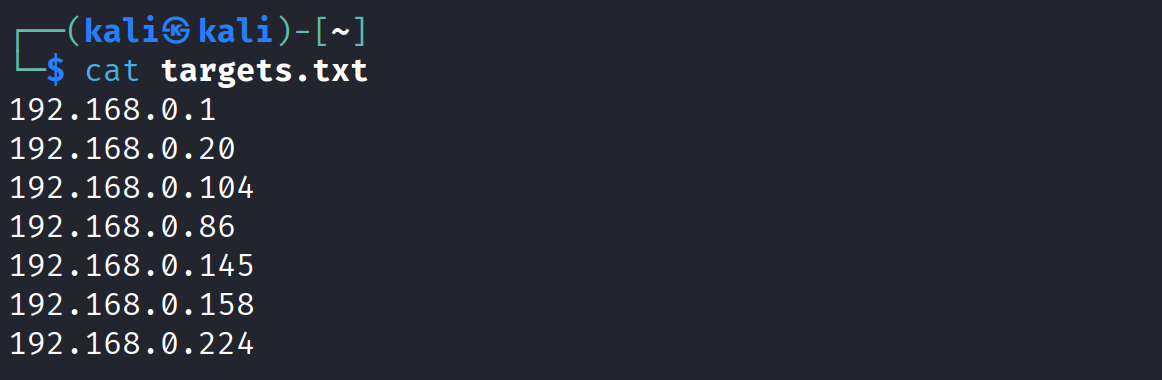
We can initiate a ping sweep to identify live hosts before performing more intrusive scans. Let's use "for loop" to iterate through the IP address in the 192.168.x.x/24 network range and send ICMP echo requests.
# Save the result in pingsweep.txt file
for i in {1..254}; do ping -c 1 192.168.x.$i -W 1 >> pingsweep.txt & done

# Let's clean the result by using grep and cut command and save the result in targets.txt
cat pingsweep.txt |grep "bytes from" |cut -d " " -f4 |cut -d ":" -f1 > targets.txt
Using Nmap
We can also use Nmap to perform host discovery efficiently.
nmap -sn 192.168.x.x/24 -oG live-hosts
The -sn flag disables port scanning and discovers hosts based on ICMP probes. The -oG outputs results in a grepable format and saves to a file named live-hosts
Service Discovery
The goal of the service discovery phase is to identify network services actively listening on the hosts discovered earlier. From an attacker’s perspective, these services represent entry points—also known as attack surfaces—into the target environment.
Service Banner
It’s not enough to simply know that a service is running on a specific port—an attacker needs detailed information about that service. Fortunately, many services expose a banner, which can reveal useful details such as the protocol in use (e.g., FTP, HTTP, RDP), the software name, and sometimes even its exact version.
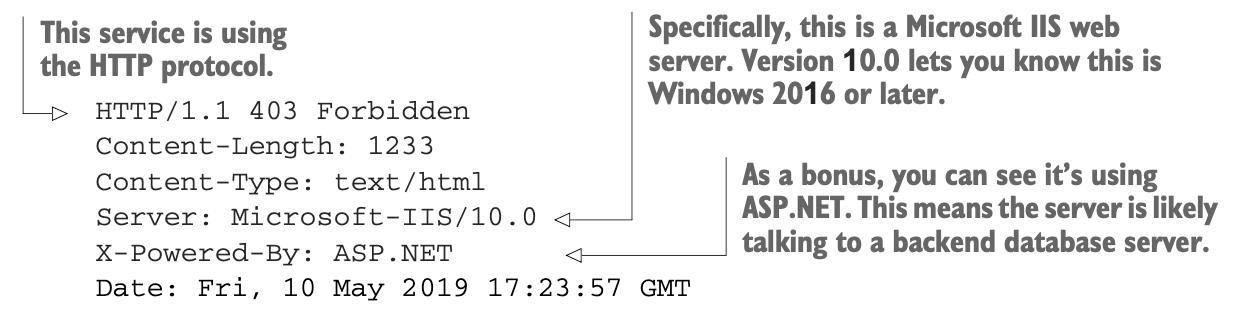
During an actual VAPT, you won’t typically be so lucky as to obtain a comprehensive network diagram, so you’ll have to discover which services are listening. This can be accomplished through port scanning using Nmap.
Top Ports Scan
While waiting for comprehensive scans to finish, which can sometimes take all day to complete it’s useful to quickly gather actionable information. To do this, we perform a quick scan of the top 10 or 20 most commonly targeted ports, often referred to as low-hanging fruit.
└─$ sudo nmap -sS -Pn -n --top-ports 1000 192.168.0.145
Starting Nmap 7.95 ( https://nmap.org ) at 2025-08-22 23:08 EDT
Nmap scan report for 192.168.0.145
Host is up (0.00089s latency).
Not shown: 992 closed tcp ports (reset)
PORT     STATE SERVICE
21/tcp   open  ftp
22/tcp   open  ssh
80/tcp   open  http
7777/tcp open  cbt
8080/tcp open  http-proxy
8090/tcp open  opsmessaging
8888/tcp open  sun-answerbook
9090/tcp open  zeus-admin
9999/tcp open  abyss
MAC Address: 08:00:27:5C:A8:F7 (PCS Systemtechnik/Oracle VirtualBox virtual NIC)

Nmap done: 1 IP address (1 host up) scanned in 0.42 seconds
Based on the results above, we could quickly see standard ports used by a web server. Specifically, two web app ports are found by the Nmap scanner. Also, noticed several services running, such as FTP, SSH, and HTTP.
Full Port Scan
With these early insights in hand, we can now proceed to launch a comprehensive scan that checks all 65,536 TCP ports.
└─$ sudo nmap -sS -Pn -n -p- 192.168.0.145
Starting Nmap 7.95 ( https://nmap.org ) at 2025-08-22 23:11 EDT
Nmap scan report for 192.168.0.145
Host is up (0.0058s latency).
Not shown: 65524 closed tcp ports (reset)
PORT      STATE SERVICE
21/tcp    open  ftp
22/tcp    open  ssh
80/tcp    open  http
7777/tcp  open  cbt
8080/tcp  open  http-proxy
8090/tcp  open  opsmessaging
8888/tcp  open  sun-answerbook
9090/tcp  open  zeus-admin
9191/tcp  open  sun-as-jpda
9999/tcp  open  abyss
11000/tcp open  irisa
12010/tcp open  edbsrvr
MAC Address: 08:00:27:5C:A8:F7 (PCS Systemtechnik/Oracle VirtualBox virtual NIC)

Nmap done: 1 IP address (1 host up) scanned in 18.17 seconds
Targeted Scan
Let’s do a targeted port scan, with service and version enumeration to discover more details on the target hosts.
└─$ sudo nmap -sV -sC -p 21,22,80,7777,8080,8090,8888,9090,9191,9999,11000,12010 192.168.0.145 -oA Keym4ker_service
<SNIP>
PORT STATE SERVICE VERSION
21/tcp open ftp vsftpd 3.0.3
| ftp-anon: Anonymous FTP login allowed (FTP code 230)
| -rw-r--r-- 1 0 0 22 Aug 22 01:01 flag.txt
| -rw-r--r-- 1 0 0 330 Aug 21 09:08 notes.txt
|_-rw-r--r-- 1 0 0 224648 Aug 21 08:57 secret.zip
| ftp-syst:
| STAT:
| FTP server status:
| Connected to 192.168.0.104
| Logged in as ftp
| TYPE: ASCII
| No session bandwidth limit
| Session timeout in seconds is 300
| Control connection is plain text
| Data connections will be plain text
| At session startup, client count was 2
| vsFTPd 3.0.3 - secure, fast, stable
|_End of status
22/tcp open ssh OpenSSH 9.2p1 Debian 2+deb12u3 (protocol 2.0)
| ssh-hostkey:
| 256 97:9a:42:4a:db:dd:ab:10:78:14:96:59:9e:ea:26:b4 (ECDSA)
|_ 256 85:f8:96:76:ca:7c:5c:f0:31:e0:08:89:a3:fe:8f:23 (ED25519)
80/tcp open http Apache httpd 2.4.62 ((Debian))
| http-cookie-flags:
| /:
| PHPSESSID:
|_ httponly flag not set
|_http-server-header: Apache/2.4.62 (Debian)
|_http-title: Vulnerable WordPress – Just another WordPress site
|_http-generator: WordPress 5.4.2
7777/tcp open http Werkzeug httpd 1.0.1 (Python 3.11.2)
|_http-title: Home
|_http-server-header: Werkzeug/1.0.1 Python/3.11.2
8080/tcp open http Apache Tomcat 10.1.44
|_http-title: Apache Tomcat/10.1.44
|_http-open-proxy: Proxy might be redirecting requests
|_http-favicon: Apache Tomcat
8090/tcp open http Apache httpd 2.4.62 ((Debian))
| http-robots.txt: 15 disallowed entries
| /joomla/administrator/ /administrator/ /bin/ /cache/
| /cli/ /components/ /includes/ /installation/ /language/
|_/layouts/ /libraries/ /logs/ /modules/ /plugins/ /tmp/
|_http-server-header: Apache/2.4.62 (Debian)
|_http-title: Home
|_http-generator: Joomla! - Open Source Content Management
8888/tcp open http Golang net/http server
| fingerprint-strings:
| FourOhFourRequest:
| HTTP/1.0 404 Not Found
| Cache-Control: max-age=0, private, must-revalidate, no-transform
| Content-Type: text/plain;charset=utf-8
| Set-Cookie: i_like_gitea=4ec4f56bdf6bce28; Path=/; HttpOnly; SameSite=Lax
| Set-Cookie: _csrf=dN4zc8vh4ZpkzNJLiS-iWDu9vOI6MTc1NTkxODkxMDI3MTAxMzEwMQ; Path=/; Max-Age=86400; HttpOnly; SameSite=Lax
| X-Content-Type-Options: nosniff
| X-Frame-Options: SAMEORIGIN
| Date: Sat, 23 Aug 2025 03:15:10 GMT
| Content-Length: 11
| found.
| GetRequest:
| HTTP/1.0 200 OK
| Cache-Control: max-age=0, private, must-revalidate, no-transform
| Content-Type: text/html; charset=utf-8
| Set-Cookie: i_like_gitea=425403570da555f3; Path=/; HttpOnly; SameSite=Lax
| Set-Cookie: _csrf=mnGNMWkHUYIBQX-OF6gwrcJvkJA6MTc1NTkxODkxMDA3MjI0MzMwNQ; Path=/; Max-Age=86400; HttpOnly; SameSite=Lax
| X-Frame-Options: SAMEORIGIN
| Date: Sat, 23 Aug 2025 03:15:10 GMT
| <!DOCTYPE html>
| <html lang="en-US" class="theme-auto">
| <head>
| <meta name="viewport" content="width=device-width, initial-scale=1">
| <title>Keym4ker Git</title>
| <link rel="manifest" href="data:application/json;base64,eyJuYW1lIjoiS2V5bTRrZXIgR2l0Iiwic2hvcnRfbmFtZSI6IktleW00a2VyIEdpdCIsInN0YXJ0X3VybCI6Imh0dHA6Ly8xOTIuMTY4LjAuMTMyOjg4ODgvIiwiaWNvbnMiOlt7InNyYyI6Imh0dHA6Ly8xOTIuMTY4LjAuMTMyOjg4ODgvYXNzZXRzL2ltZy9sb2dvLnBuZyIsInR5cGUiOiJpbWFnZS9wbmciLCJzaXplcyI6IjUxMng1MTIifSx7InNyYyI6Imh0dHA6Ly8xOTIuMTY4LjAuMTM"
| HTTPOptions:
| HTTP/1.0 405 Method Not Allowed
| Allow: HEAD
| Allow: HEAD
| Allow: GET
| Cache-Control: max-age=0, private, must-revalidate, no-transform
| Set-Cookie: i_like_gitea=61674a112aa5fe06; Path=/; HttpOnly; SameSite=Lax
| Set-Cookie: _csrf=fC6tb17N_0bUlQyCrgbedae6TeY6MTc1NTkxODkxMDI2MzA5Mjc0Nw; Path=/; Max-Age=86400; HttpOnly; SameSite=Lax
| X-Frame-Options: SAMEORIGIN
| Date: Sat, 23 Aug 2025 03:15:10 GMT
|_ Content-Length: 0
|_http-title: Keym4ker Git
9090/tcp open http Apache httpd 2.4.62 ((Debian))
|_http-server-header: Apache/2.4.62 (Debian)
|_http-title: keym4ker helpdesk
9191/tcp open http Apache httpd 2.4.62
|_http-title: 404 Not Found
|_http-server-header: Apache/2.4.62 (Debian)
9999/tcp open http Jetty 12.0.22
|_http-server-header: Jetty(12.0.22)
|_http-title: Site doesnt have a title (text/html;charset=utf-8).
| http-robots.txt: 1 disallowed entry
|_/
11000/tcp open hadoop-tasktracker Apache Hadoop 2.4.62 ((Debian))
| hadoop-datanode-info:
|_ Logs: btn btn-info pull-right
|_http-trane-info: Problem with XML parsing of /evox/about
| hadoop-tasktracker-info:
|_ Logs: btn btn-info pull-right
|_http-title: qdPM | Login
12010/tcp open http Apache httpd 2.4.62 ((Debian))
|_http-server-header: Apache/2.4.62 (Debian)
|_http-title: PHP Training Lab
| http-cookie-flags:
| /:
| PHPSESSID:
|_ httponly flag not set
<SNIP>
Scanning Large Network Ranges When dealing with a large network with several hundred IP addresses, it’s often best to adjust our approach for efficiency. Start with a basic TCP connect scan (-sT) across all 65,535 ports, without enabling service detection or NSE scripting.
Once the initial scan is complete, follow up with a more comprehensive scan using -sV and -sC for version detection and default scripts but limit the scope to just the open ports discovered earlier. This two-step process significantly reduces scan time while still giving detailed insights where it matters most.
Note: We could also perform a port scan without using nmap in the event we are limited. We could use nc
for i in `seq 20 5000`; do nc -vz -w 1 -n 192.168.0.145 $i 2>&1 | grep succeeded; done
Service Enumeration
The scan verified that we are dealing with a Debian server. Let's extract the most helpful information from the scan to distinguish relevant information from distracting details.
// Grep all running services
└─$ egrep -v "^#|Status: Up" Keym4ker_service.gnmap | cut -d ' ' -f4- | tr ',' '\n' | sed -e 's/^[ \t]*//' | awk -F '/' '{print $7}' | grep -v "^$" | sort | uniq -c | sort -k 1 -nr
      4 Apache httpd 2.4.62 ((Debian))
      1 Werkzeug httpd 1.0.1 (Python 3.11.2)
      1 vsftpd 3.0.3
      1 OpenSSH 9.2p1 Debian 2+deb12u3 (protocol 2.0)
      1 Golang net|http server
      1 Apache Tomcat 10.1.44
      1 Apache httpd 2.4.62
      1 Apache Hadoop 2.4.62 ((Debian))
Vulnerability Discovery
Now that we have a visibility of listening services and protocol-specific target lists, let's proceed to the vulnerability discovery phase. In this phase we need to perform the following actions to identify exploitable weaknesses such as missing software updates; insecure configuration settings; and missing, weak, or default credentials
- Identify target patch-level
- Analyze web-based attack surfaces
- Try common credentials
Patch Level Enumeration
Discovering patching vulnerabilities is as straightforward as identifying exactly which version of a particular software your target is running and then comparing that version to the latest stable release available from the software vendor.
| Tool | Use |
|---|---|
| Exploit-DB | Contains list of all the current known exploitable attack vectors and determine which ones your target might be vulnerable to |
| Searchsploit | A command line search tool for Exploit-DB |
Web Enumeration
Web applications are where we usually spend most of our time during a security assessment. They often present a vast attack surface and can suffer from many classes of vulnerabilities that can lead to remote code execution or sensitive data exposure.
| Tool | Use |
|---|---|
| Nikto | Web server scanner for detecting outdated software, misconfigurations, and issues. |
| Gobuster | A versatile tool that allows for performing DNS, vhost, and directory brute-forcing |
| Ffuf | Fast web fuzzer for discovering hidden directories, files, subdomain, vhosts, and parameters in web apps. |
| dig | A command-line DNS diagnostic tool |
| EyeWitness | Take screenshots of each web application |
Authentication Enumeration
The easiest way to detect authentication vulnerabilities is to perform a brute-force password-guessing attack.
| Tool | Use |
|---|---|
| Hydra | Brute-force login tool for testing credentials on services (e.g., SSH, FTP, RDP |
| JohnTheRipper | Password cracker for offline password hashes (e.g., shadow files, hashes). |
| Hashcat | High-performance GPU-based password cracker for cracking complex hash types. |
| CME | Automates enumeration, authentication, and lateral movement. |
Port 21 - FTP Enumeration
As shown in the Nmap output, anonymous FTP login is enabled. Let's login to the FTP service with the credentials anonymous/anonymous.
└─$ ftp 192.168.0.145
Connected to 192.168.0.145.
220 (vsFTPd 3.0.3)
Name (192.168.0.145:kali): anonymous
331 Please specify the password.
Password:
230 Login successful.
Remote system type is UNIX.
Using binary mode to transfer files.

ftp> ls
229 Entering Extended Passive Mode (|||20183|)
150 Here comes the directory listing.
-rw-r--r--    1 0        0              22 Aug 22 01:01 flag.txt
-rw-r--r--    1 0        0             330 Aug 21 09:08 notes.txt
-rw-r--r--    1 0        0          224648 Aug 21 08:57 secret.zip
226 Directory send OK.

ftp> get flag.txt
local: flag.txt remote: flag.txt
229 Entering Extended Passive Mode (|||43557|)
150 Opening BINARY mode data connection for flag.txt (22 bytes).
100% |*********************************************************************|    22        4.76 KiB/s    00:00 ETA
226 Transfer complete.
22 bytes received in 00:00 (3.64 KiB/s)

ftp> get notes.txt
local: notes.txt remote: notes.txt
229 Entering Extended Passive Mode (|||54835|)
150 Opening BINARY mode data connection for notes.txt (330 bytes).
100% |*********************************************************************|   330       63.50 KiB/s    00:00 ETA
226 Transfer complete.
330 bytes received in 00:00 (48.80 KiB/s)

ftp> get secret.zip
local: secret.zip remote: secret.zip
229 Entering Extended Passive Mode (|||52559|)
150 Opening BINARY mode data connection for secret.zip (224648 bytes).
100% |*********************************************************************|   219 KiB    7.97 MiB/s    00:00 ETA
226 Transfer complete.
224648 bytes received in 00:00 (7.78 MiB/s)
Connecting with the anonymous user and a blank password works. After a few inspection we discovered a notes.txt. Viewing the content of the file.
└─$ cat notes.txt
Hey Team,

I discovered this cool way of storing secrets in an image. If you want to try it, I hid my ssh password in the image on this server. Also, please note the following tasks.
TODO:
1. Remediate the CVE-2020-7246 from our app
2. Update the polling to the latest version
3. Secure our main site and secret page
4. John will now manage our ticketing system

Best,
James
Next, the tester attempted to unzip the secret.zip file.
└─$ unzip secret.zip
Archive:  secret.zip
[secret.zip] im_invisible.jpg password:
Since it was password-protected, the tester noted that zip2john could be used to perform a brute-force attack; however, this step was left for later.
HTTP Ports Enumeration - Using eyewitness
EyeWitness is a tool to quickly have screenshots of each web application hosted in the target server. As a first step, we must create a file containing valid virtualhosts.
// Create a vhosts file
nano vhosts
// Content of vhosts file
cat vhosts
192.168.0.145
192.168.0.145:7777
192.168.0.145:8080
192.168.0.145:8090
192.168.0.145:8888
192.168.0.145:9090
192.168.0.145:9191
192.168.0.145:9999
192.168.0.145:11000
192.168.0.145:12010
Executing eyewitness
└─$ eyewitness -f vhosts -d Keym4ker_eyewitness
################################################################################
#                                  EyeWitness                                  #
################################################################################
#           Red Siege Information Security - https://www.redsiege.com           #
################################################################################

Starting Web Requests (9 Hosts)
Attempting to screenshot http://192.168.0.145:
Attempting to screenshot http://192.168.0.145:7777
Attempting to screenshot http://192.168.0.145:8080
Attempting to screenshot http://192.168.0.145:8090
Attempting to screenshot http://192.168.0.145:8888
Attempting to screenshot http://192.168.0.145:9090
Attempting to screenshot http://192.168.0.145:9191
Attempting to screenshot http://192.168.0.145:9999
Attempting to screenshot http://192.168.0.145:11000
Attempting to screenshot http://192.168.0.145:12010
Finished in 38.32170915603638 seconds
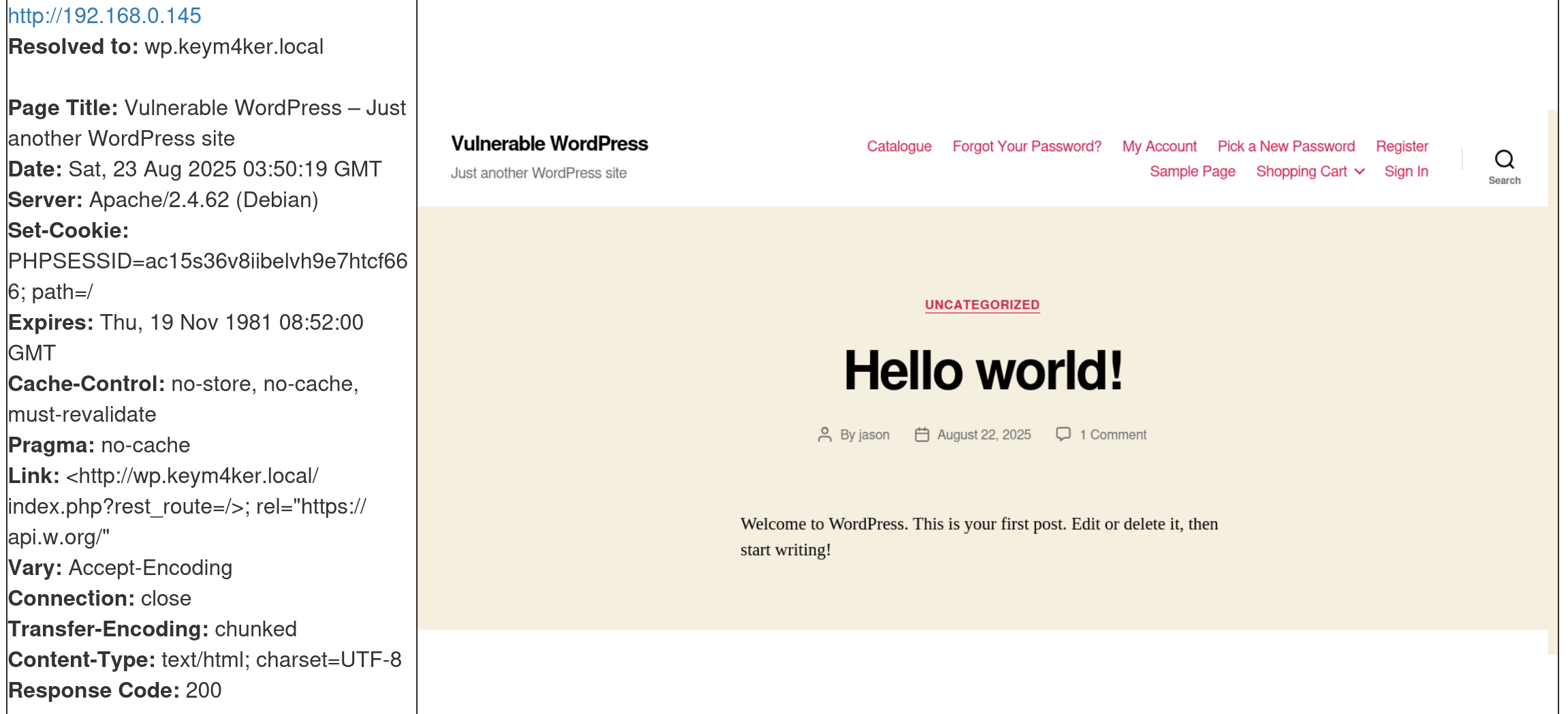
Port 80 is hosting a WordPress CMS
WordPress (WP) is a widely used open-source Content Management System (CMS) known for its ease of use, high customizability, and SEO-friendly features. Its modular design allows users to extend functionality through a wide variety of themes and plugins. However, this extensibility also introduces potential security risks, particularly through third-party plugins and themes, which are common vectors for vulnerabilities if not properly maintained or vetted.
WordPress is primarily written in PHP and typically runs on an Apache web server, with MySQL serving as the backend database.
Use Cases of WordPress
- Blogs & Personal Websites.
- Corporate Websites & Portfolios.
- E-commerce Platforms (with plugins like WooCommerce).
- Learning Management Systems (LMS).
- Community & Membership Sites (forums, social networks via plugins).
From a Pentesting Perspective: WordPress is a frequent target because of its widespread use. Key risks include:
- Outdated Core, Plugins, or Themes → Vulnerabilities in old versions often lead to RCE, SQLi, or privilege escalation.
- Default or Weak Credentials → Many sites leave default accounts or use weak passwords.
- XML-RPC Abuse → Can be exploited for brute-force attacks or DDoS amplification.
- Insecure Plugins/Themes → Poorly coded or malicious plugins may expose the site to attacks.
- File Upload Issues → Exploitable upload forms leading to web shells.
- Information Disclosure → User enumeration via author archives or error messages.
- Privilege Escalation → Exploiting misconfigured roles or plugin vulnerabilities.
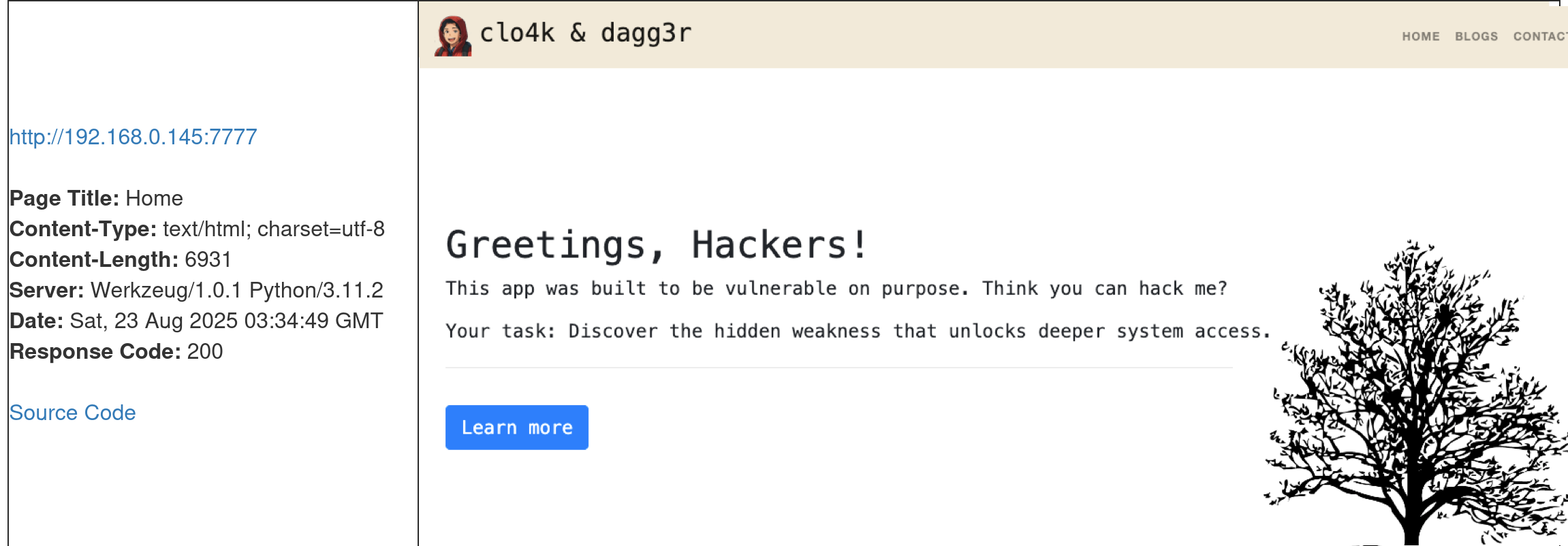
Port 7777 server is Werkzeug
Werkzeug is a Python library that provides a set of utilities for building web applications. Werkzeug sits between the web application code and the server making it easier to handle requests, responses, and routing.
Key Features of Werkzeug
- WSGI Support → Provides a WSGI-compliant interface for building Python web applications.
- HTTP Utilities → Tools for request and response handling, URL parsing, cookies, sessions, and headers.
- Routing System → Flexible URL routing that supports mapping URLs to Python functions.
- Debugging Tools → Built-in debugger with an interactive console for inspecting runtime issues.
- Development Server → Lightweight server to test and run applications locally.
Use Cases
- Flask Framework → Flask uses Werkzeug as its core for routing, request/response objects, and debugging.
- Custom Web Frameworks → Developers can use Werkzeug components to build lightweight custom frameworks
- Prototyping & Development → The built-in server and debugger make it useful for quick testing and development.
- Learning Tool → Often used in educational settings to understand how WSGI and HTTP handling work in Python.
From a Pentesting Perspective
- Exposed Debug Console → Werkzeug includes a powerful interactive debugger that allows Python code execution in the browser. If left enabled in production, it can be exploited for Remote Code Execution (RCE).
- Default Configurations → Running applications with debug=True in Flask (which uses Werkzeug) exposes the debugger to anyone who can access the app.
- Information Disclosure → Error pages may reveal stack traces, server paths, or environment variables.
- Attack Surface:
- Exploiting Werkzeug Debug PIN to gain shell access.
- Enumerating and abusing misconfigurations in Flask/Werkzeug apps.
- Leveraging the interactive console to run arbitrary Python commands on the server.
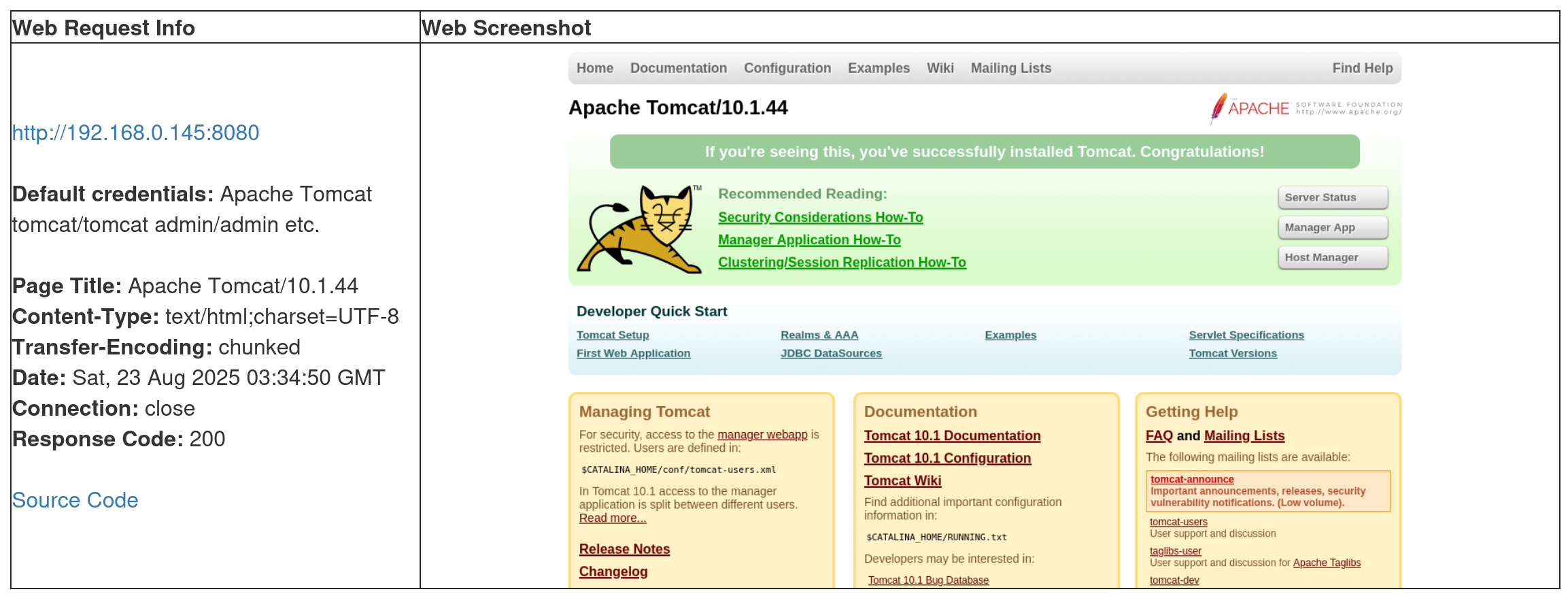
Port 8080 is running Apache Tomcat
Apache Tomcat is an open-source web server that hosts applications written in Java. Tomcat was initially designed to run Java Servlets and Java Server Pages (JSP) scripts. However, its popularity increased in Java-based frameworks and is now widely used by frameworks such as Spring and tools such as Gradle.
Key Points about Tomcat:
- Purpose → Runs Java Servlets and JavaServer Pages (JSP), which are technologies for building dynamic web applications.
- Language Support → Primarily Java.
- Default Ports → Typically listens on port 8080 (HTTP) and optionally 8443 (HTTPS).
- Deployment → Web applications are deployed in .war (Web Application Archive) files.
- Integration → Can run standalone or be used alongside a reverse proxy like Apache HTTPD or Nginx.
- Management → Comes with a Manager App and an Admin App (if enabled) for deploying and managing applications through a web interface.
Common Use Cases:
- Hosting Java web applications.
- Running enterprise applications that rely on servlets/JSP.
- Serving as a backend app server with Nginx/Apache HTTPD as the frontend.
From a Pentesting Perspective:
- Default credentials (e.g., tomcat:tomcat, admin:admin) are often left unchanged.
- The Tomcat Manager application is a common attack surface (allows WAR file deployment, leading to remote code execution if compromised).
- Older versions are vulnerable to RCE, directory traversal, authentication bypass, and deserialization attacks.
- Misconfigured Tomcat servers may expose sensitive configuration files (server.xml, web.xml).
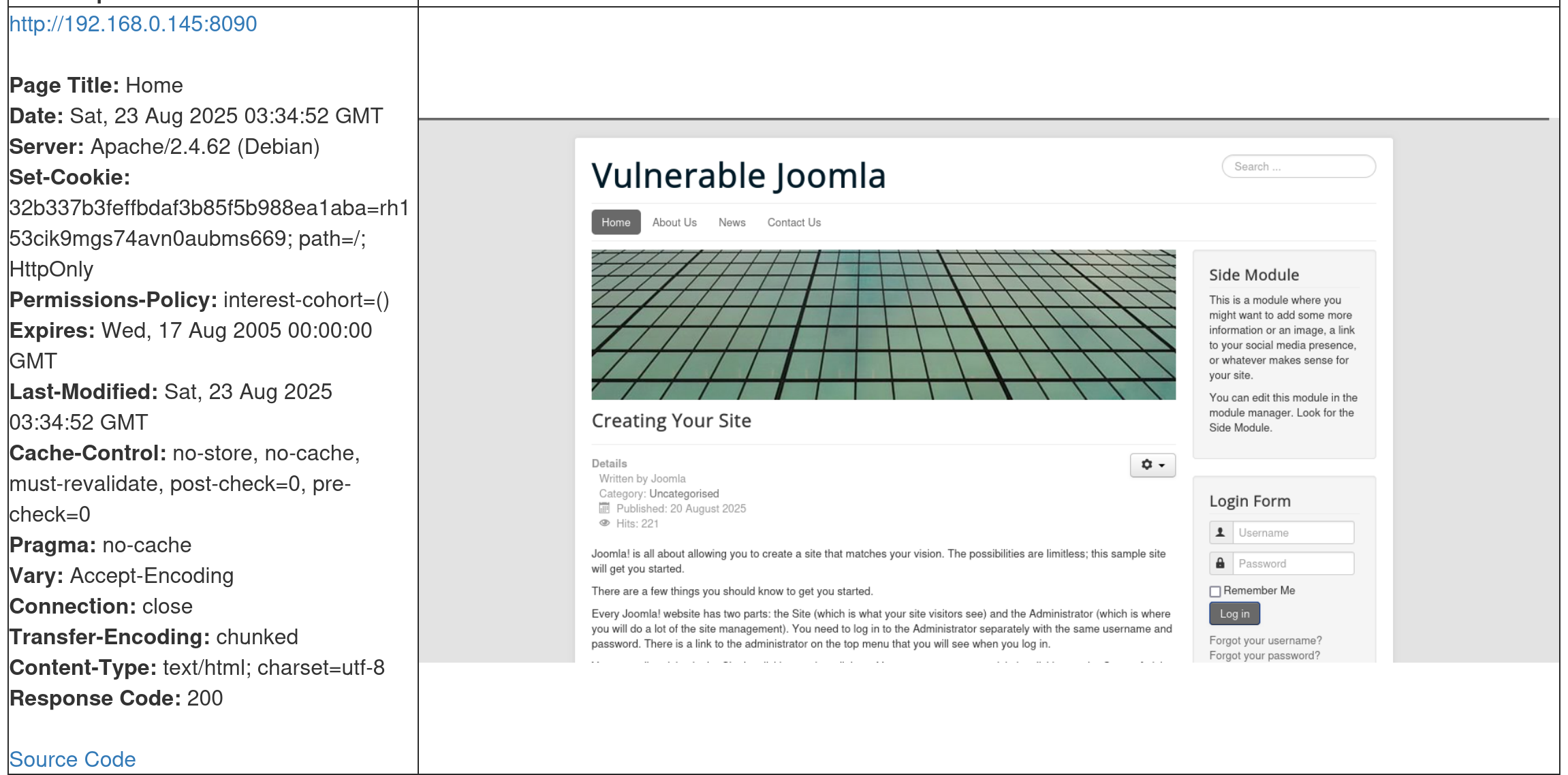
Port 8090 is hosting a Joomla CMS
Joomla is a free and open-source content management system (CMS) used to build and manage websites and online applications. It’s written in PHP, stores data in MySQL or MariaDB, and uses a modular, template-based design that allows administrators to customize websites without needing to code everything from scratch.
Key Features of Joomla:
- User Management → Built-in authentication, access levels, and permissions.
- Templates & Themes → Easily change the site’s look and feel.
- Extensions → Thousands of plugins, modules, and components to extend functionality.
- Multilingual Support → Core support for multiple languages without needing add-ons.
- Content Publishing → Manage articles, categories, menus, and media.
- Community Support → Large developer and user community providing updates and extensions.
Use Cases:
- Corporate websites and portals.
- Online communities and forums.
- E-commerce sites (with extensions like VirtueMart).
- Government and non-profit websites.
From a pentesting perspective:
- Joomla sites can be vulnerable if running outdated versions, plugins, or templates.
- Common issues include SQL injection, RCE via extensions, weak admin credentials, and misconfigurations.
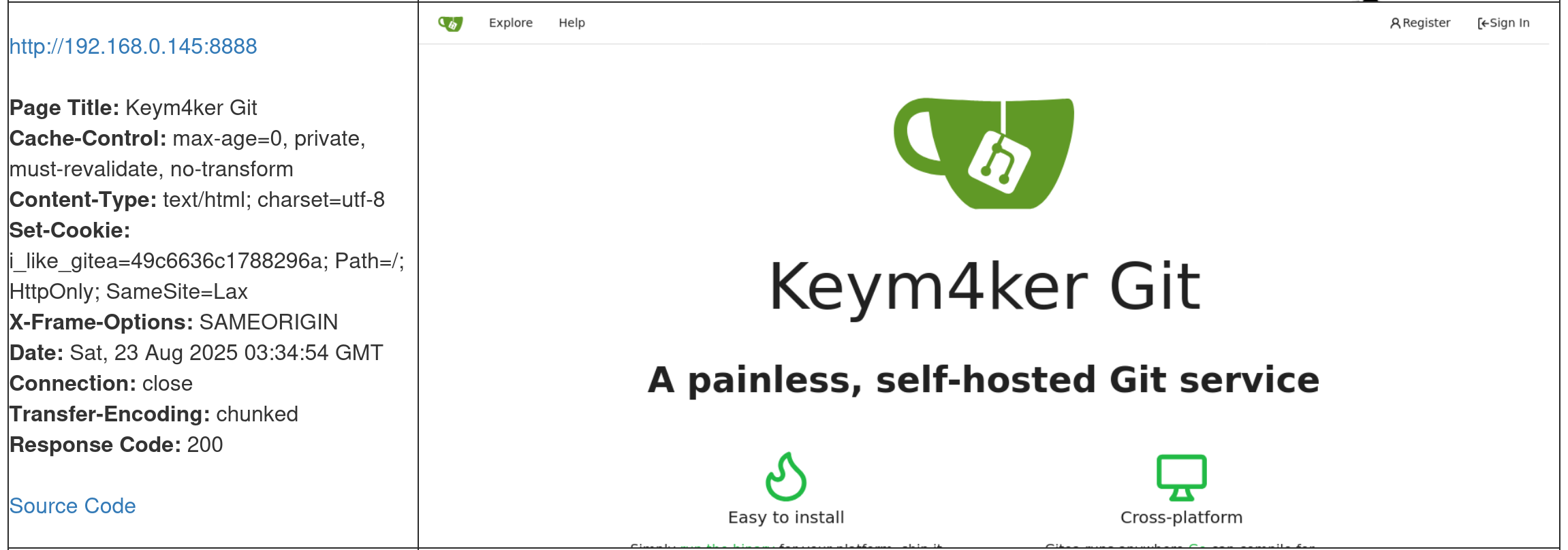
Port 8888 is running Gitea
Gitea is a lightweight, self-hosted Git service written in Go. It’s an alternative to platforms like GitHub, GitLab, and Bitbucket, but designed to be more resource-efficient and easy to deploy.
Key Features of Gitea
- Git Repository Hosting → Manage code with Git (clone, push, pull).
- Web Interface → Simple web UI for browsing code, issues, and pull requests.
- User & Team Management → Access control, organizations, and permissions.
- Issues & Pull Requests → Lightweight project management tools built in.
- Integrations → Supports webhooks, CI/CD pipelines, and API usage.
- Cross-Platform → Runs on Linux, macOS, and Windows.
Use Cases
- Small to medium dev teams wanting a self-hosted GitHub-like experience.
- Organizations that prefer on-premises source code control for security or compliance.
- Personal projects where developers want full control of their Git hosting.
From a Pentesting Perspective
- Exposed Repositories → May leak source code or credentials.
- Default/Weak Credentials → Common issue if self-hosted securely is overlooked.
- Vulnerable Versions → Outdated Gitea releases may contain RCE or privilege escalation flaws.
- Misconfigurations → Public signups, open repos, or mis-set permissions can lead to data leakage.
- API Abuse → If tokens are exposed, attackers may perform unauthorized actions.
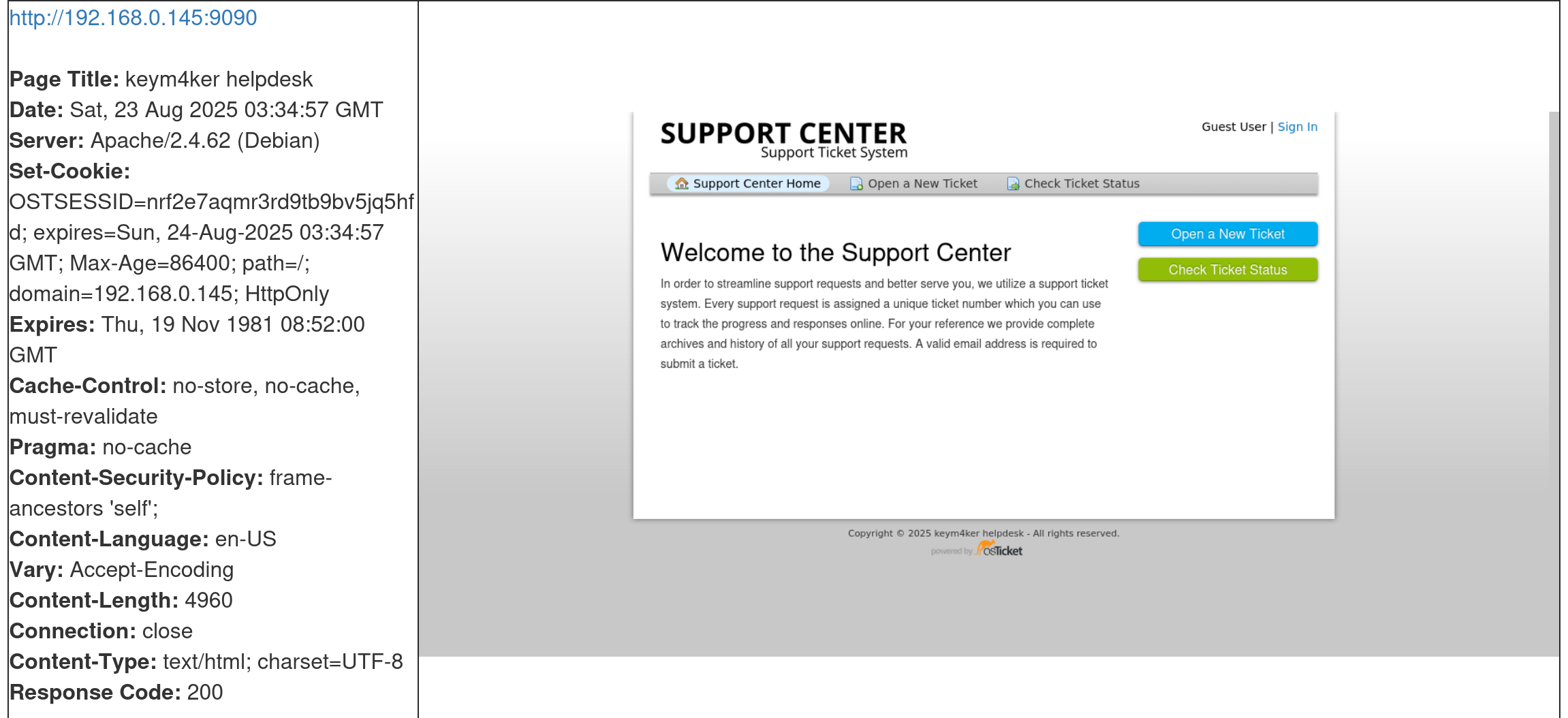
Port 9090 is running osTicket
osTicket is a free, open-source ticketing system used for customer support and helpdesk management. It allows organizations to manage, organize, and track customer service requests (tickets) through a web-based interface.
Key Features of osTicket:
- Ticket Management → Converts emails, web forms, and phone calls into tickets that can be tracked.
- Email Integration → Automatically creates tickets from incoming support emails.
- Agent & Department Routing → Assign tickets to specific teams or agents.
- Canned Responses → Predefined replies for common issues.
- Custom Fields & Forms → Tailor the ticket system to business needs.
- Customer Portal → End users can track the status of their requests.
- Reporting → Basic reports on ticket volume, response times, etc.
Use Cases:
- IT helpdesks for handling support requests.
- Customer service teams for managing inquiries.
- Internal support (HR, facilities, etc.) to track internal requests.
From a Pentesting Perspective:
- Default credentials (e.g., ostadmin:password) are sometimes left unchanged.
- Outdated versions of osTicket have had SQL injection, XSS, file upload, and authentication bypass vulnerabilities.
- Misconfigured permissions can expose sensitive tickets with personal or business data.
- Sensitive Information Exposure: Ticket attachments may include logs, configs, or documents with confidential info.
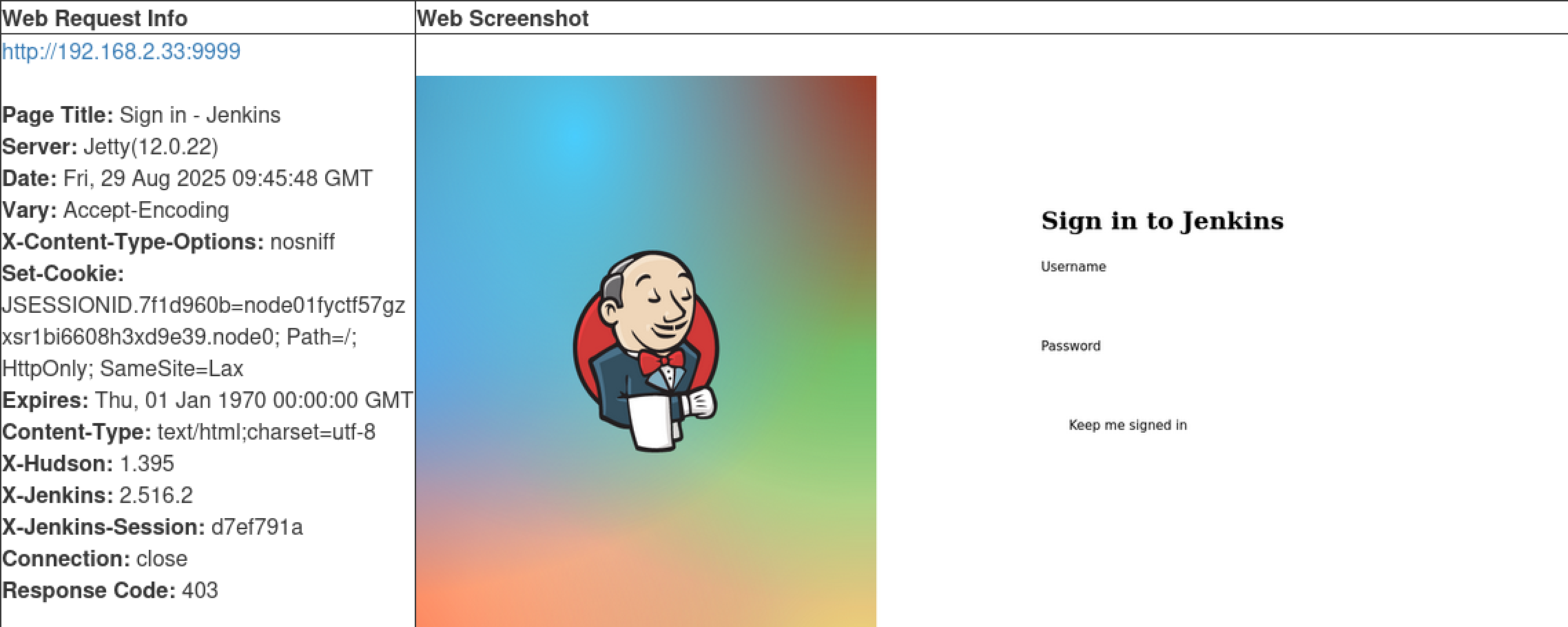
Port 9999 is hosting a Jenkins app
Jenkins is a popular open-source automation server widely used for CI/CD. It helps developers automate building, testing, and deploying applications, making software development faster, more reliable, and more consistent.
Key Features of Jenkins
- Pipeline Automation → Automates the entire software delivery pipeline (build → test → deploy).
- Plugin Ecosystem → Over 1,800 plugins to integrate with tools like Git, Docker, Kubernetes, Ansible, and cloud services.
- Web-Based Interface → Simple dashboard to configure jobs, monitor builds, and view logs.
- Distributed Builds → Supports running jobs across multiple servers (build agents).
- Extensibility → Highly customizable with Groovy scripts and plugin development.
Common Use Cases
- Automating compilation and testing of applications.
- Continuous deployment to staging or production environments.
- Integration with GitHub/GitLab/Bitbucket for automated builds on code commits.
- Running scheduled tasks (e.g., nightly builds, security scans).
From a Pentesting Perspective
- Exposed Jenkins Panels (default at
:8080) may reveal build pipelines and credentials. - Default/Weak Credentials (e.g.,
admin:admin) often left unchanged. - Script Console (Groovy) can lead to Remote Code Execution (RCE) if accessible.
- Credential Storage → Jenkins stores secrets, API keys, and SSH keys that can be extracted.
- Outdated Versions → Past CVEs include deserialization RCE, privilege escalation, and plugin vulnerabilities.
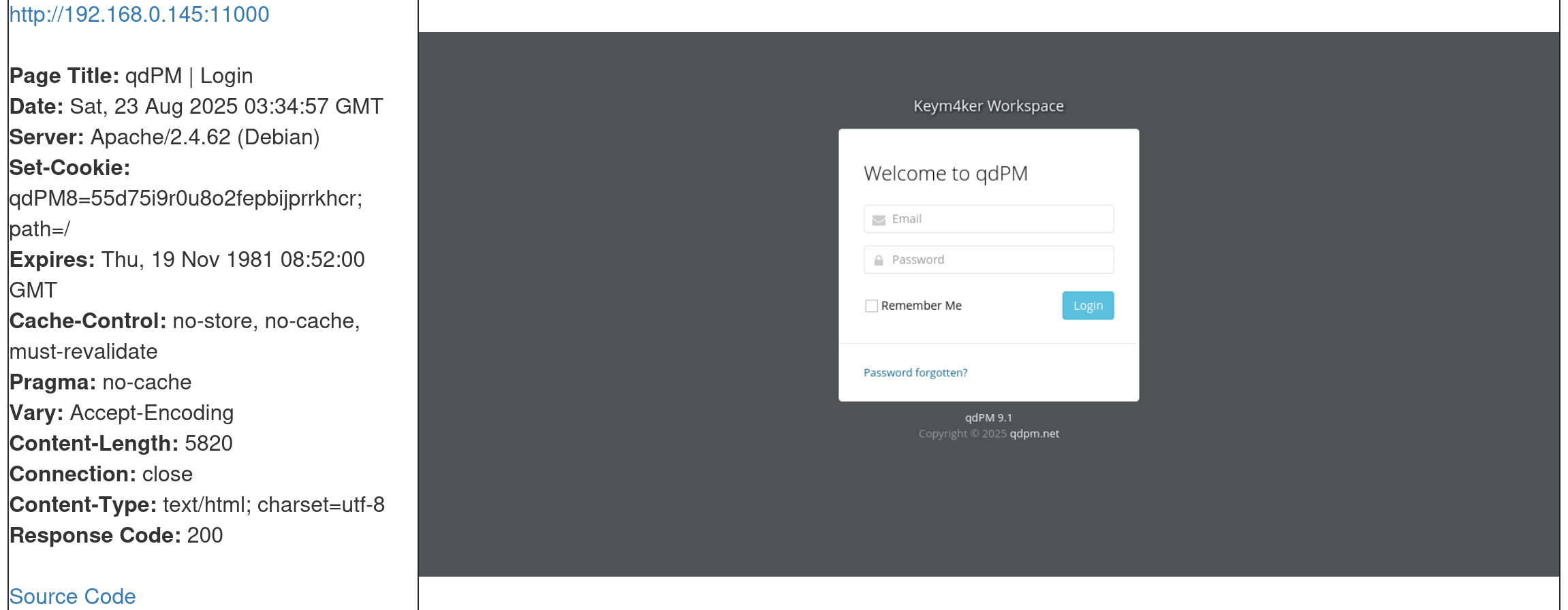
Port 11000 is running qdPM
qdPM is a free, open-source project management tool built in PHP and MySQL, designed for small and medium-sized businesses. It focuses on managing projects, tasks, and teams with a web-based interface.
Key Features of qdPM:
- Project & Task Management → Create, assign, and track projects and tasks.
- User Roles & Permissions → Different access levels (Administrator, Manager, Developer, Client).
- Client Management → Clients can log in to view project progress.
- Issue Tracking → Report and monitor bugs or support requests.
- Customizable Workflows → Define priorities, statuses, and categories.
- Time Tracking & Reporting → Log time against tasks and generate project reports.
Use Cases:
- Software development teams tracking features and bugs.
- Agencies managing multiple client projects.
- Businesses coordinating internal projects and tasks.
From a Pentesting Perspective:
- Default credentials sometimes remain enabled after installation.
- Outdated versions of qdPM have been found vulnerable to:
- SQL Injection (CVE-2020-7246, CVE-2020-7247).
- Cross-Site Scripting (XSS).
- Remote Code Execution (RCE) via file upload flaws.
- Role Misconfiguration → Low-privileged users (like clients) may escalate privileges.
- Sensitive Data Exposure → Projects and tasks often contain business-critical or client-sensitive data.
The EyeWitness tool shows us multiple very interesting web apps, any one of which could potentially be leveraged to gain a foothold in the internal network. Let's work through them one by one.